

Key Takeaways
- Incorrect lead tracking can lead to poor marketing decisions and wasted budgets.
- A form click or WhatsApp click does not always mean a customer has contacted your business.
- GA4 can measure website activity, but sales records help confirm real enquiries and qualified leads.
- Before trusting your marketing reports, ask your team to test the tracking and verify the results.
Your marketing report says your website is generating leads. However, your sales team says they received fewer enquiries than expected.
So, which number should you trust?
For a business owner, this is more than a reporting problem. You might increase advertising spending because your dashboard shows strong results. Yet some of those reported leads may only be button clicks.
The opposite can also happen. Your website may receive real enquiries that never appear in your analytics report. As a result, you could underestimate a marketing channel that is working.
There is also a bigger concern. What if customers are trying to contact you, but your website form is not working properly?
These problems can look similar in a report. However, each one requires a different solution.
GA4 lead tracking helps you understand how visitors interact with your website. Google Analytics 4 (GA4) records these actions. Google Tag Manager (GTM) can help your team manage how those actions are tracked.
However, neither tool automatically knows whether a WhatsApp message was sent, whether your team received an enquiry, or whether someone became a customer.
In this guide, you will learn why accurate tracking matters, what your business should measure, and how to check whether your reports reflect real opportunities.
You do not need to become an analytics expert. You need to know what the numbers mean, what questions to ask, and when to trust the results.
Table of Contents
- Why Does Accurate Lead Tracking Matter for Your Business?
- Are Website Clicks, Enquiries and Qualified Leads the Same Thing?
- Why Might Your Website Report Different Lead Numbers From Your Sales Team?
- What Should Your Marketing Team Actually Track in GA4?
- Can Google Analytics Tell You How Many WhatsApp Leads You Received?
- How Do You Know Which Website Enquiries Are Worth Following Up?
- How Can You Check Whether Your Lead Tracking Is Working Correctly?
- What Should a Business Owner Look for in a Website Lead Report?
- What Should You Ask Your Agency or Website Team to Fix First?
- Final Takeaway: Better Marketing Decisions Start With Reliable Lead Data
- Frequently Asked Questions
Why Does Accurate Lead Tracking Matter for Your Business?
Accurate lead tracking helps you understand whether your marketing efforts are creating real business opportunities.
Without reliable tracking, you may spend money on the wrong campaigns. You could also overlook successful marketing channels or miss problems in your enquiry process.
Imagine a villa management company in Bali. The business promotes its services through Google Ads, social media, and organic search.
Its website offers two contact options: an enquiry form and a WhatsApp button.
The marketing team reports strong lead activity. However, the sales team does not see the same number of suitable enquiries.
The owner wants to know whether marketing is working. Yet the numbers do not tell a clear story.
Before changing the advertising budget, the owner needs to understand what each report measures.
When Marketing Reports Look Better Than Actual Results
Sometimes, a report looks positive because the tracking counts actions that never became enquiries.
For example:
- A visitor clicks Submit, but the form shows an error.
- A visitor opens WhatsApp but does not send a message.
- One successful form submission gets counted twice.
- The business receives enquiries from people who are not suitable customers.
These situations are different.
The first three involve tracking or customer actions. The fourth involves lead quality.
However, if your report treats all of them as successful leads, you may believe your marketing produces more opportunities than it actually does.
That can affect how you judge campaign performance and marketing spending.
How Incorrect Data Can Affect Business Decisions
Unreliable lead tracking can influence several important business decisions.
Marketing budgets. You might increase spending on a campaign because it generates many clicks. However, those clicks may not become real enquiries.
Agency performance. You may compare agencies using different definitions of a lead. As a result, the comparison may not be fair or useful.
Sales planning. Your team might expect more enquiries than it actually receives. This can make it difficult to plan follow-up work.
Website improvements. You may invest in a new contact page when the real issue is incorrect tracking. Alternatively, you could keep paying for traffic while a broken form stops enquiries from reaching you.
It is important to separate these problems. Incorrect tracking makes reports unreliable. A broken form can prevent customers from contacting your business.
Both need attention, but they require different fixes.
If you want to understand how marketing results connect with revenue, read Kesato’s guide to measuring SEO ROI with GSC, GA4, and CRM data.
For now, the first goal is simple: make sure you understand what your website is counting.
Are Website Clicks, Enquiries and Qualified Leads the Same Thing?
No. These actions show different levels of customer interest.
A visitor may click your contact button without sending a message. Another visitor may submit a genuine enquiry but turn out to be unsuitable for your services.
Meanwhile, someone who becomes a customer may have contacted your business several times before making a decision.
Because of this, your reports should not treat every interaction as the same result.
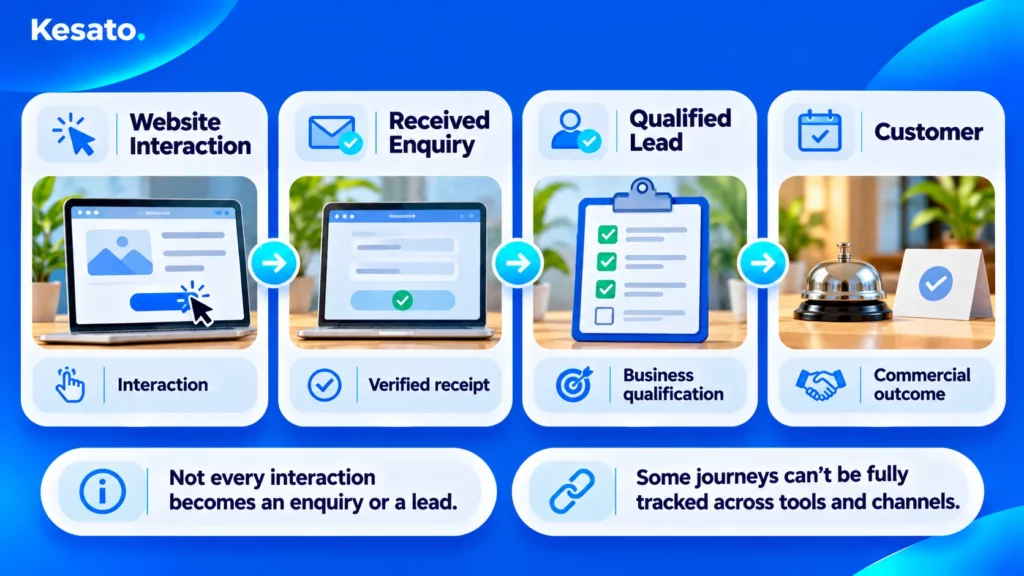
Understand the Difference Between Interest and an Actual Enquiry
The table below explains what common website actions can tell you.
| Customer action | What it tells you | What it does not prove |
|---|---|---|
| Contact button click | Someone tried to open a contact option. | They sent an enquiry. |
| Form submission detected | The website detected a submission action. | The business received the enquiry. |
| Confirmed form success | The system confirmed that it accepted the submission. | The enquiry is qualified or has reached every intended recipient. |
| WhatsApp button click | Someone clicked to open WhatsApp. | They sent a message. |
| Received enquiry | The business received a customer request. | The customer is a suitable prospect. |
| Qualified lead | The enquiry meets your business requirements. | The prospect will become a customer. |
| Confirmed customer | The business recorded a sale or booking. | One marketing action caused that sale. |
For example, your website might show a success message after accepting a contact form. That is useful evidence.
However, your team should also confirm that the message reaches the correct inbox or customer management system.
This extra check helps you separate successful website processing from successful business delivery.
Decide What Your Business Should Count as a Lead
Before setting up tracking, agree on what the word “lead” means for your business.
For a villa management company, a received enquiry might be a message from someone asking about property management services.
A qualified lead could be a property owner whose location and requirements match the company’s services.
A hotel may use different criteria for wedding enquiries, group bookings, and room reservations.
Therefore, there is no single lead definition that works for every business.
Start by answering three questions:
- Which website actions show customer interest?
- What confirms that your business received an enquiry?
- Who decides whether an enquiry is qualified?
Once your team agrees on these definitions, your analytics reports become easier to understand.
Why Might Your Website Report Different Lead Numbers From Your Sales Team?
Your GA4 report and sales records may show different lead numbers. However, that does not always mean one of them is wrong.
For example, GA4 may count website actions. Meanwhile, your sales team may count received enquiries or individual prospects.
The systems may also use different dates or counting rules.
Before fixing anything, find out what each number represents.
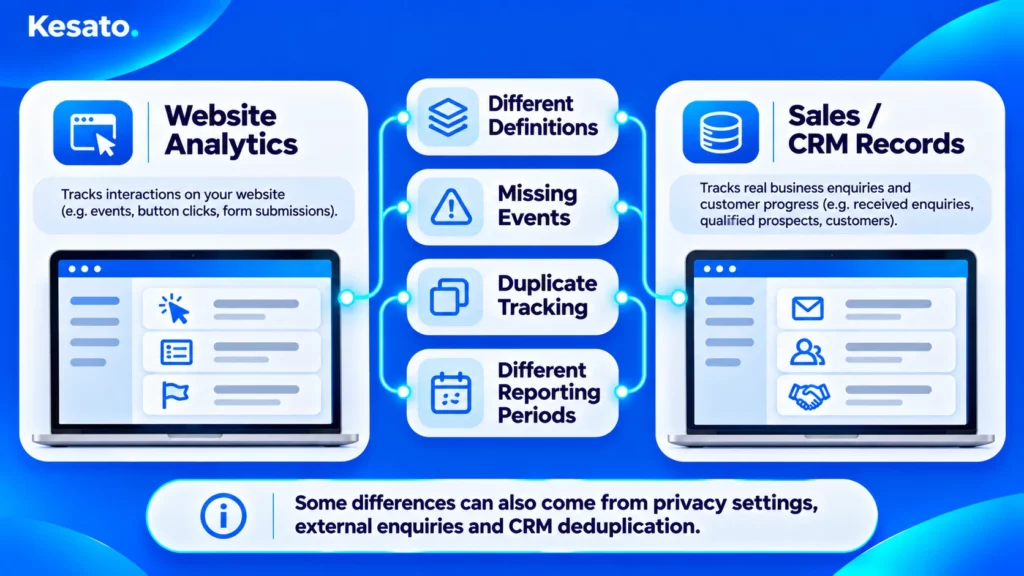
When Tracking Counts an Action That Never Became an Enquiry
Some tracking systems record an event too early.
For example, a form may send a tracking event when someone clicks Submit. However, the form could still fail because a required field is missing.
The tracking may also count a WhatsApp click as a lead, even if the visitor never sends a message.
Another common problem is counting the same action more than once.
This can happen when a website plugin and Google Tag Manager both record the same successful form submission.
However, remember that one person can also make several genuine enquiries. For this reason, the number of recorded events may differ from the number of individual prospects.
Ask your team to explain what triggers each event and how repeated actions are counted.
When Real Enquiries Are Missing From Analytics
The opposite can happen, too.
A customer may submit a form successfully, but GA4 may not record the event.
Possible reasons include an incorrect tracking setup, browser restrictions, or privacy and consent settings.
Also, not every enquiry starts on your website. Customers may contact you directly through phone calls, email, or WhatsApp.
Other reasons for different totals include:
- Your reports use different dates or time zones.
- Your sales team records an enquiry after the website visit.
- Your CRM combines several messages from the same customer.
- Your team removes spam or irrelevant enquiries.
- Some website visits cannot be fully measured because of privacy or technical restrictions.
As a result, GA4 may not match your sales records exactly, even when the tracking works as intended.
Instead of forcing the numbers to match, ask your team to explain the difference.
Kesato’s hospitality digital marketing audit guide also explains why businesses should review the complete customer journey, not just individual reports.
What Should Your Marketing Team Actually Track in GA4?
Your business should track actions that help explain customer interest and real enquiries.
However, not every tracked action should count as a lead.
GA4 records website events, such as clicks and form interactions. GTM can help your team decide when those events are sent.
The important question is whether each event reflects the action it is supposed to measure.
Measure Successful Form Enquiries, Not Just Submit Attempts
GA4 can detect certain form actions through its Enhanced Measurement feature.
For example, form_start records a detected form interaction. Meanwhile, form_submit records a detected submission action.
These events can help your marketing team understand how visitors use a form.
However, they do not automatically confirm that the business received an enquiry.
For more reliable lead tracking, ask your team to identify when a submission succeeds.
Depending on your website, that may involve:
- A confirmation from the website system that it accepted the form.
- A dedicated thank-you page that appears only after a successful submission.
- A reliable success event from the form platform.
Your team should also check that reloading a thank-you page does not create a false new lead.
Some forms work with standard GTM Form Submission triggers. Others use JavaScript and need a different approach.
Therefore, there is no single tracking method that works for every contact form.
A simple example for your technical team
If your developer controls the form, they can send a signal after the website confirms a successful submission.
Here is an example of that signal:
window.dataLayer = window.dataLayer || [];

window.dataLayer.push({
  event: "contact_form_success",
  form_type: "general_enquiry"
});
This code sends information to the website’s data layer. Think of the data layer as a way for your website to tell tracking tools that an action happened.
Next, GTM can use this signal to send a generate_lead event to GA4.
However, the developer must run this code only after the form reaches the agreed success point. Adding the code to a Submit button is not enough.
The team should then confirm that the receiving system has the enquiry record.
This example explains the approach. It is not ready-to-use code for every website.
Google provides more details in its data layer documentation.
Use Clear Event Definitions for Different Lead Actions
Your analytics team should also use clear names for different activities.
This helps everyone understand what the reports measure.
| What to measure | GA4 event | When to count it |
|---|---|---|
| Form interaction | form_start |
When a form interaction is detected. |
| Form submission action | form_submit |
When a submission action is detected. |
| Successful form lead | generate_lead |
When the agreed success condition is confirmed. |
| WhatsApp button click | whatsapp_click |
When someone clicks the intended WhatsApp button. |
| Qualified lead | qualify_lead |
When your business confirms the lead meets its criteria. |
| Converted lead | close_convert_lead |
When your business confirms the agreed customer outcome. |
Google recommends event names such as generate_lead, qualify_lead, and close_convert_lead.
In contrast, whatsapp_click is a custom name used to track a WhatsApp button interaction.
You can review these definitions in Google’s recommended events guide.
Keep in mind that qualified lead and customer events do not appear automatically. Your business must have a reliable way to record those outcomes.
GA4 also lets your team mark important actions as key events.
For many lead-generation websites, a confirmed form submission is a more useful lead-acquisition key event than a general button click.
You may still track WhatsApp clicks as an important action. However, your reports should label them as clicks rather than confirmed enquiries.
Can Google Analytics Tell You How Many WhatsApp Leads You Received?
GA4 can track WhatsApp button clicks on your website. However, those clicks do not prove that your business received WhatsApp enquiries.
This distinction matters for businesses that depend on WhatsApp to communicate with potential customers.
For example, a visitor might click your WhatsApp button and open the app. Then they may decide not to send a message.
Your website may record the click, but it cannot confirm that a conversation happened.
What a WhatsApp Button Click Actually Tells You
GA4 can record certain clicks that take visitors to other websites or applications.
For example, its Enhanced Measurement feature can track supported outbound links.
Your analytics team can also create a custom event called whatsapp_click.
To do this, they may configure GTM to detect clicks on the website’s WhatsApp links.
However, the correct setup depends on how your website button works. Some buttons use normal links, while others use scripts.
After setting up the event, your team should test it.
The result should tell you how many WhatsApp clicks GA4 recorded under the available measurement conditions.
It should not be presented as the number of messages or qualified leads.
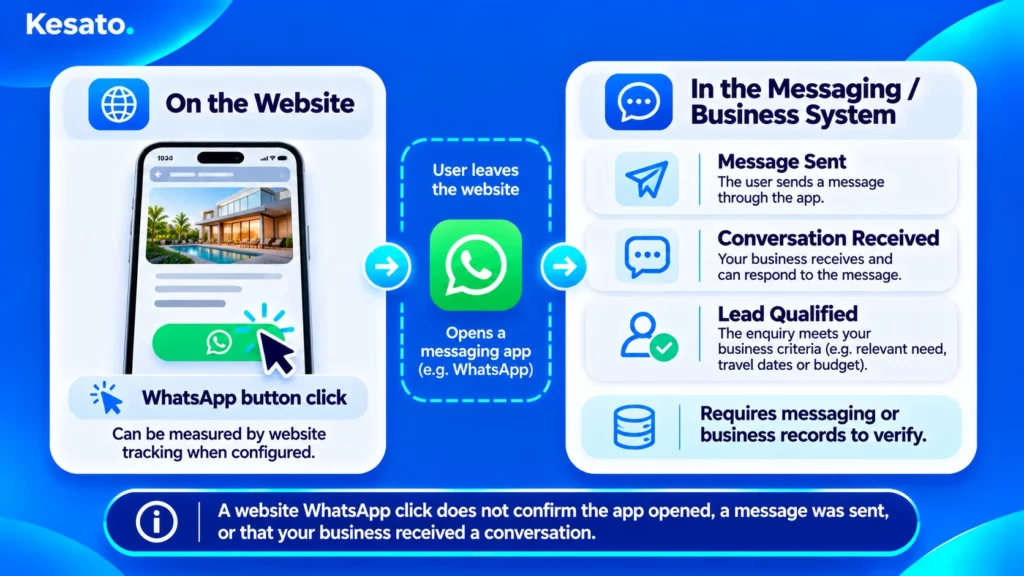
How to Compare Website Clicks With Real Conversations
To understand what happens after the click, review the information available from your WhatsApp business process.
For example, ask your team:
- How many customer conversations did the business receive?
- How many were genuine enquiries?
- How many enquiries met your business requirements?
- Can the team identify where those enquiries came from?
However, not every WhatsApp conversation begins with a website click.
Customers may find your number through Google Business Profile, social media, referrals, or previous conversations.
Therefore, you should not assume that every WhatsApp message came from the website.
Also, matching individual website clicks with conversations may require a suitable messaging or CRM system.
For many businesses, this connection may not yet be available.
In that case, report website clicks and received conversations separately.
Protect customer information. WhatsApp links can contain phone numbers or prefilled messages. Some tracking setups may collect the full link address.
Because of this, your analytics team should review the information sent to GA4. Do not send private names, email addresses, personal phone numbers, or message content to Google Analytics.
Google explains these requirements in its guidance on personal information.
The main lesson is simple: WhatsApp clicks show interest. Business records help confirm actual enquiries.
How Do You Know Which Website Enquiries Are Worth Following Up?
Not every enquiry is a good business opportunity.
For example, a hotel may receive a request for a service it does not offer. A villa management company may receive messages from people looking for short-term accommodation rather than property management.
These are real enquiries. However, they may not match the business’s goals.
That is why lead quality matters alongside lead volume.
Define What a Qualified Lead Means for Your Business
Start by agreeing on clear criteria with your sales or reservations team.
Depending on your business, a qualified lead may need to meet several conditions:
- The customer needs a service you provide.
- The location or property is within your service area.
- Your business can meet the customer’s requirements.
- The enquiry contains enough information for your team to respond.
- The request is genuine rather than spam or unrelated interest.
For example, a villa management business might qualify an enquiry when a property owner’s location and service needs fit its offering.
Meanwhile, a hotel may consider event dates, guest capacity, or room availability.
These examples are only starting points. Your business should define what a suitable opportunity means for its own services.
Connect Marketing Reports With Sales or CRM Records
GA4 helps you understand the first interactions on your website.
However, the story often continues after the enquiry arrives.
Your sales team may contact the prospect, confirm their requirements, send a proposal, or record a booking.
A Customer Relationship Management (CRM) system can help record these later steps.
For example, a CRM may show whether an enquiry is new, qualified, being followed up, or converted into a customer.
Google provides recommended GA4 events for some of these stages. However, sending those outcomes to GA4 requires a suitable setup.
It does not happen automatically when you install GTM.
If your business does not use a CRM, start with a consistent sales record. Then compare it with your website reports.
Also, make sure any future integration protects customer privacy. Do not send personal contact details through ordinary GA4 event parameters.
The first priority is not building a complicated tracking system. It is knowing which enquiries your business receives and what happens next.
How Can You Check Whether Your Lead Tracking Is Working Correctly?
A tracking event appearing in GA4 does not always mean your lead measurement is correct.
For example, the event might fire too early, fail to record a valid submission, or count one action twice.
Therefore, your team should test more than one situation.
As a business owner, you do not need to run every test yourself. However, you should know what proof to request.
Ask Your Team to Test Successful and Failed Enquiries
Ask your agency or website team to test the following scenarios.
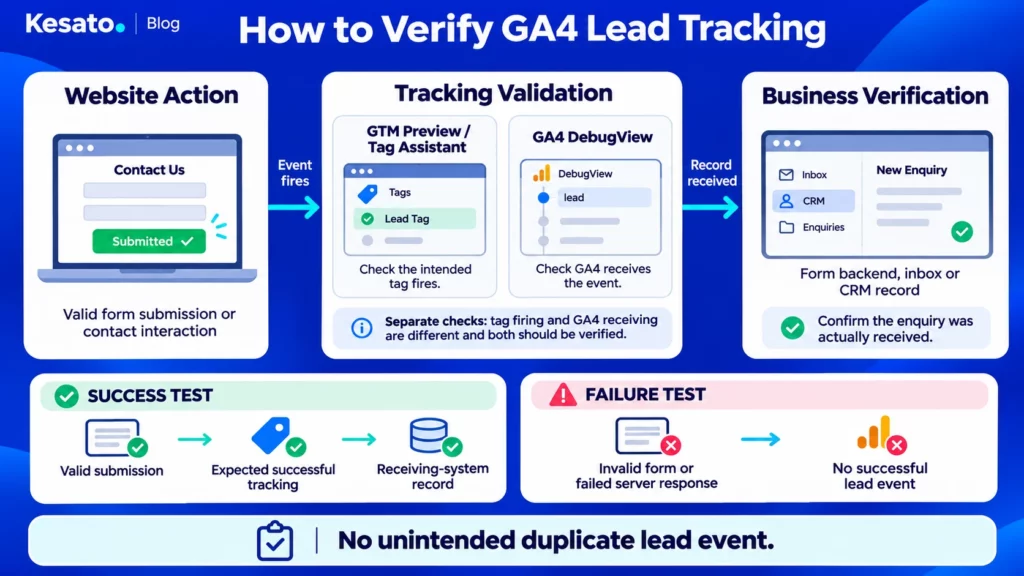
| Test | Expected result | Why it matters |
|---|---|---|
| Submit an empty form | No successful lead event. | Prevents false leads. |
| Submit a form with invalid information | No successful lead event. | Stops failed submissions from being counted. |
| Submit a valid form that the system accepts | One intended successful lead event. | Confirms the tracking records successful submissions. |
| Test a failed server response safely | No successful lead event. | Prevents reports from counting rejected submissions. |
| Reload the confirmation page | No new lead from the reload alone. | Helps prevent duplicate reporting. |
| Click the WhatsApp button once | One intended click event under normal test conditions. | Checks that the click is recorded correctly. |
| Open WhatsApp without sending a message | A click may be recorded, but not a confirmed enquiry. | Prevents inflated enquiry numbers. |
| Compare the form test with the inbox or CRM | The expected enquiry record is present. | Confirms the business received the test enquiry. |
Use approved test data and avoid creating unwanted customer records.
Also, your team should perform tests that could affect the website on a safe test environment whenever necessary.
Some situations, such as server failures, may require developer or platform-provider support.
Verify GA4 Events Against What Your Business Receives
Your technical team can use two tools to help test tracking.
GTM Preview, also called Tag Assistant. This tool helps the team see whether tracking tags activate during a test.
GA4 DebugView. This feature helps the team check which test events Google Analytics receives from a device using debug mode.
However, the tools answer different questions.
A GTM tag activating does not prove that GA4 received the event. Also, an event appearing in GA4 does not prove that your business received the enquiry.
For that reason, ask the team to check the complete process:
- Did the visitor perform the intended action?
- Did the website confirm that the action succeeded?
- Did the correct tracking tag activate?
- Did GA4 receive the expected event under suitable test conditions?
- Did the inbox, form system, or CRM receive the enquiry?
- Was the successful submission counted only once?
These checks help distinguish a tracking problem from a problem with the actual enquiry process.
Google provides instructions for GTM Preview and GA4 DebugView.
Keep in mind that privacy settings or consent choices may affect which events appear during testing.
If the team finds duplicate events, ask them to investigate the cause.
For example, two tracking tools may record the same successful form submission.
GA4 also offers different ways to count key events, including once per event and once per session.
However, changing the counting method does not fix a tracking event that fires incorrectly.
The team should correct the tracking setup and test it again.
What Should a Business Owner Look for in a Website Lead Report?
A useful lead report does not need dozens of charts.
Instead, it should help you understand three things: customer interest, real business opportunities, and whether the data is reliable.
Review Lead Volume, Quality and Data Reliability Separately
Ask your marketing team to organise the report into three areas.
1. Website activity
Show important interactions, such as form activity, confirmed form-success events, and WhatsApp clicks.
Make sure each number has a clear label.
2. Business enquiries and lead quality
Where records are available, show how many enquiries the business received and how many were qualified.
If possible, include later outcomes such as confirmed customers or bookings.
3. Tracking reliability
Explain whether the important tracking tests passed. Also, identify any data gaps that may affect the report.
For example, if the business cannot match WhatsApp clicks with actual conversations, the report should clearly say so.
During your monthly marketing review, consider asking:
- What actions does GA4 currently count as leads?
- Are our important contact forms working properly?
- Do successful form submissions reach our team?
- Are WhatsApp clicks reported separately from conversations?
- How do we decide whether a lead is qualified?
- Are there tracking problems that affect our conclusions?
Remember, the numbers from GA4, WhatsApp, and your CRM may not match perfectly.
That is not always a problem. However, your team should understand and explain the important differences.
Use the Results to Make Better Marketing Decisions
Consider our earlier example of a Bali villa management company.
Suppose its marketing report shows many WhatsApp clicks. However, the business does not know how many people actually sent enquiries.
The owner should not treat all those clicks as qualified leads.
Instead, the team should first review its tracking definitions and available conversation records.
Then the business can evaluate its marketing results with better information.
Another situation may reveal the opposite problem. The sales team receives suitable enquiries, but GA4 does not record the successful form events.
In that case, the tracking may need attention before the owner evaluates that marketing channel.
Still, remember that reliable tracking does not explain every business result.
Customer demand, pricing, service quality, competition, and response times can also affect sales.
For a broader view of paid marketing decisions, see Kesato’s guide to Google Ads vs Meta Ads for Bali hospitality businesses.
What Should You Ask Your Agency or Website Team to Fix First?
Not every tracking problem has the same impact.
For example, a broken form that prevents customers from contacting your business needs more urgent attention than an unclear dashboard label.
So, start by identifying which issues affect real enquiries and important marketing decisions.
Prioritize Problems That Distort Important Decisions
Use this table to decide where your team should begin.
| Problem | Recommended action | Who should help? |
|---|---|---|
| Form enquiries do not reach the business. | Check the form and receiving system immediately. | Developer, form provider, and operations team. |
| Failed submissions count as successful leads. | Correct the tracking and test the form again. | Analytics team and developer. |
| One enquiry gets counted more than once. | Find and correct duplicate tracking. | Analytics team. |
| WhatsApp clicks appear as confirmed enquiries. | Correct the event definition and reporting label. | Marketing and analytics teams. |
| The team has no clear lead qualification process. | Agree on qualification rules and recording responsibilities. | Sales or reservations management. |
| CRM and analytics are not connected. | Review whether an integration would add useful information. | Business owner, CRM team, and analytics team. |
| Dashboard labels are unclear. | Improve the reporting explanations. | Marketing team. |
These recommendations are starting points. Your team should confirm the actual problem before making changes.
Also, not every issue requires rebuilding the tracking system.
Sometimes, a small change to a trigger or event definition can solve the problem. In other cases, the form or business process needs attention.
Agree on Responsibilities and Proof of Completion
After finding a problem, ask your team to explain:
- What went wrong?
- How did they confirm the problem?
- Which reports or customer actions were affected?
- Who will fix it?
- How will they test the result?
- What limitations will remain?
For example, suppose the website records invalid form submissions as leads.
After fixing the tracking, the team should show that invalid submissions no longer create successful lead events.
They should also confirm that valid submissions still work and reach the correct business system.
This gives you evidence that the issue was resolved.
Finally, be careful when comparing reports from before and after a tracking correction.
The number of recorded leads may change because the measurement improved. That does not automatically mean customer demand increased or decreased.
Final Takeaway: Better Marketing Decisions Start With Reliable Lead Data
Your website tracking should help you understand whether marketing efforts create real business opportunities.
Start by defining what your business counts as an enquiry and a qualified lead.
Remember that a button click is not always an enquiry. Also, a received enquiry does not always become a qualified prospect or a customer.
Use GA4 to measure website activity. Then use your receiving systems and sales records to understand what happens after the first interaction.
Most importantly, ask your marketing or website team to show how they test the tracking.
When the data is incomplete, understand the limitations before using it to make major budget decisions.
Reliable lead tracking helps you see whether marketing is generating real enquiries or simply website interactions. If you’re unsure whether your reports reflect what your business receives, Kesato can help review your tracking setup and identify areas for improvement. Get in touch with our team to discuss your website tracking needs.
Frequently Asked Questions
Can GA4 Tell Me Exactly How Many Leads My Website Generates?
GA4 can track lead events that your website sends. However, it does not automatically confirm every enquiry or qualified prospect. The results depend on how your tracking works and what GA4 can collect. Compare the reports with business records to understand real enquiries and lead quality.
Does a WhatsApp Click Count as a Lead?
A WhatsApp click shows that someone used a contact option on your website. However, it does not prove they sent a message. To confirm received conversations or qualified leads, you need records from your WhatsApp business process or another suitable system.
Why Are GA4 Lead Numbers Different From My CRM?
GA4 and your CRM may measure different actions. For example, GA4 might count website events, while your CRM records customer enquiries and sales progress. Different dates, counting rules, privacy settings, or tracking problems can also affect the totals. First, check what each system measures.
How Can I Tell Whether My Website Contact Form Is Working?
Ask your team to test both valid and invalid submissions. A valid form should reach the intended receiving system and trigger the correct tracking event. Meanwhile, failed submissions should not count as successful leads. Also, check that one submission does not create duplicate lead events.
Do I Need Google Tag Manager to Track Website Leads?
Not always. GA4 can detect some website interactions through Enhanced Measurement. Other supported tracking methods are also available. However, GTM can make it easier to manage custom tracking. Choose the setup that fits your website and test it carefully.
Editorial note: The examples in this article are illustrative and were prepared with AI-assisted editorial support. The Bali villa management scenario is hypothetical. This guide does not represent a client-specific analytics audit or guarantee business results.


