

Key takeaways
- A finished website is not necessarily ready for Google Search.
- Ask your developer and SEO team for proof that important launch checks have passed.
- If you are replacing an existing website, protect valuable pages and plan for changed URLs.
- Verify the live website after launch, not just the version you approved during development.
Your new website looks ready. The design is approved, the pages are built, and your developer is preparing to publish it.
But what happens when someone searches for your business on Google?
Will search engines be able to access the important pages? What happens to the Google traffic your existing website already receives? And if something goes wrong after launch, who is responsible for finding and fixing it?
These are questions worth answering before approving your website launch.
This website launch SEO checklist explains what business owners should ask their developers and SEO teams to check before and after going live. It also shows what evidence to request and how to decide whether a problem needs to be fixed before launch.
You do not need to understand every technical setting. You need to know what should work, who is checking it, and how your team can demonstrate that the website is ready.
Table of contents
- Why Can a Finished Website Still Have Problems on Google?
- Are You Launching a New Website or Replacing an Existing One?
- What Should You Agree With Your Developer Before Launch?
- Website Launch SEO Checklist: What Should Be Checked Before Going Live?
- If You’re Replacing a Website, What Happens to Your Existing Google Traffic?
- What Should Your Developer Show You Before You Approve the Launch?
- What Needs to Happen When the Website Goes Live?
- How Do You Know Everything Is Still Working After Launch?
- Is Your Website Ready to Launch, or Should You Fix Something First?
- Final Takeaway: Don’t Approve a Website Launch Based on Design Alone
- Frequently Asked Questions
Why Can a Finished Website Still Have Problems on Google?
A finished design does not prove that a website is ready for search engines. Its pages also need to be accessible, supported by suitable technical settings, and connected to the correct website addresses.
During development, a website is often built on a private test environment, commonly called staging. This allows the team to work without exposing an unfinished website to the public.
Before launch, however, the team needs to confirm that restrictions used during testing have not accidentally affected the public website.
Consider a hypothetical boutique resort in Bali preparing to replace its existing website.
The new design is approved, room pages display correctly, and the booking button works. But during development, the test pages were configured to stay out of Google Search.
If those restrictions are copied to the live website, important pages may remain excluded from Google’s index even though visitors can open them normally.
A different problem occurs when the resort changes its room-page URLs without correctly handling the previous addresses. Guests using an old saved link might encounter an error, while Google needs to discover and assess the new URLs.
These are different problems, but both may be missed when the launch review focuses only on appearance.
Google explains that crawling and indexing depend on multiple conditions. Even a technically accessible page is not guaranteed to appear in Search. A launch checklist therefore helps prevent avoidable problems; it cannot promise immediate indexing or specific rankings.
The first step is understanding whether your project is a completely new website or a replacement for one that already exists.
Are You Launching a New Website or Replacing an Existing One?
Both projects need SEO preparation, but they do not start from the same position.
A new business website needs a clear structure and accessible content. An established website may also have existing URLs, search rankings, backlinks and customer traffic that the new version must account for.
Launching Your First Website
If your business is launching a website for the first time, start with the essentials:
- Can visitors and search engines access the important public pages?
- Does each page clearly explain its purpose?
- Are important pages connected through navigation and links?
- Are the intended page addresses, titles and other SEO settings correct?
- Can the business measure visits and relevant customer actions?
You may not have historical Google Search Console performance data to compare against. Your team is establishing a foundation and preparing to monitor how the website develops.
Do not assume that submitting a sitemap or publishing a homepage will immediately bring customers from Google. Search discovery and business growth remain separate processes.
Redesigning or Moving an Existing Website
If your website already receives organic traffic, the review needs an additional question:
What will happen to the pages and content people currently find through Google?
Changing the design does not automatically require changing URLs. But a new CMS, different page structure or domain change can introduce important differences.
The table below shows which requirements need special attention.
| Requirement | Brand-new website | Existing website replacement |
|---|---|---|
| Clear page structure | Plan the new pages | Review existing and proposed pages |
| Search accessibility | Check new public pages | Check new pages and changed settings |
| Important content | Prepare content for launch | Identify what should remain, change or be consolidated |
| Existing organic performance | Usually no meaningful historical baseline | Record relevant pages and search performance |
| Old-to-new URL mapping | Only if existing URLs are being replaced | Needed when existing URLs change |
| Redirect testing | Conditional | Important when URLs are moved |
| Analytics | Establish suitable measurement | Check continuity and changes in tracking |
| Post-launch review | Establish an initial baseline | Compare against historical performance with context |
Google’s guidance distinguishes website moves that change URLs from hosting changes that keep the same URLs. They require different checks.
Kesato’s guide to SEO priorities for new and established websites explains why a new site and an established site should not follow the same long-term optimisation strategy.
For this launch checklist, the most important distinction is whether the project has existing search visibility or URLs worth protecting.
What Should You Agree With Your Developer Before Launch?
Website problems often become difficult to resolve when nobody has agreed who owns the relevant task.
A developer may be responsible for the code and deployment. An SEO specialist may identify the search requirements. A business owner or project manager may be responsible for approving the scope and deciding when the website can go live.
These responsibilities can overlap, especially on smaller projects. What matters is that they are understood before launch.
Agree on Important Pages, URLs and Business Goals
Start with the pages your business needs visitors to find and use.
For a resort, that could mean its accommodation pages, dining information, location, special experiences and booking path.
For a service business, the priority may be service pages, case studies and contact forms. An ecommerce business may have product and category pages that require additional checks.
Ask your team to confirm:
- Which pages must be available when the website launches?
- Which URLs will be used?
- Which existing pages are being retained, replaced or removed?
- Which business actions must work, such as enquiries, bookings or purchases?
- Who is responsible for the final content and technical review?
A page inventory helps prevent important pages from being forgotten simply because they were not included in the latest design presentation.
If your business operates in several languages, also confirm how the language versions and their search signals will be handled. Requirements such as hreflang depend on the website’s actual international setup.
Decide Who Is Responsible for SEO Checks
The owner does not need to approve individual lines of code. Instead, agree on the responsibilities and evidence needed for launch approval.
A practical division may look like this:
- Business owner or project manager: Confirms important pages, customer actions, priorities and final acceptance criteria.
- SEO specialist: Reviews search accessibility, intended URLs, page information, internal links and migration requirements where applicable.
- Developer: Implements the agreed settings, repairs technical problems and verifies the production release.
- Analytics or marketing team: Checks that essential business measurement is working, with developer or vendor assistance as required.
For some projects, one person or agency may cover several roles. For others, the work may involve an external developer, an SEO partner and a booking system provider.
Agree who makes the final go-live decision and who responds if a problem is found after deployment.
For a broader view of why these responsibilities should be considered together, see Kesato’s article on planning web design and SEO as one system.
Website Launch SEO Checklist: What Should Be Checked Before Going Live?
This is the main SEO checklist to review with your developer and SEO team.
Its purpose is not to turn business owners into technical specialists. Each item should result in a clear answer and, where relevant, evidence that the requirement has been tested.
Can Google Access the Pages You Want People to Find?
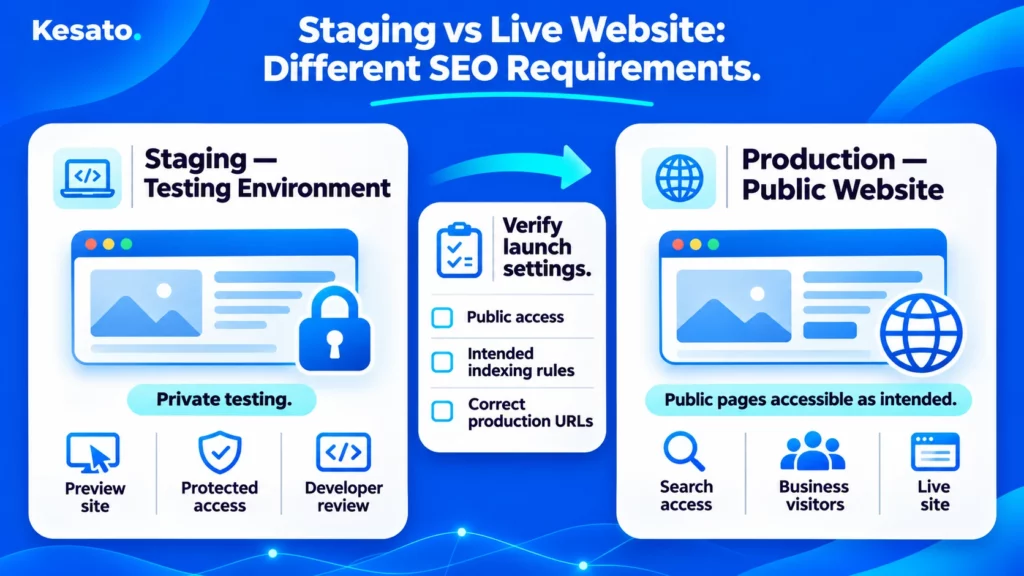
Start by checking the difference between the test website and the version that will be published.
Staging protection. Test environments containing unfinished or private information should be protected appropriately. Password protection or other access controls are generally more suitable for sensitive staging content than relying on robots.txt.
Production accessibility. Confirm that public pages are not unintentionally blocked by a password, firewall, robots.txt rule, or noindex instruction.
A noindex instruction tells supported search engines not to include a page in their results when the crawler can access and process that instruction. Google also explains that blocking a page in robots.txt can prevent its crawler from seeing the noindex directive. The two settings should not be confused.
The same rule does not apply to every page. Certain private, duplicate or administrative pages may intentionally remain unavailable for indexing.
The question for your team is whether the correct pages are accessible and eligible for indexing.
Are Your Important Pages and SEO Settings Ready?
Review the pages that matter most to your business rather than focusing only on the homepage.
Check whether they have:
- Clear page titles and descriptions relevant to the content.
- Appropriate page headings and useful written information.
- Working internal links from relevant parts of the website.
- Correct canonical signals where they are needed.
- Final production URLs rather than links to the test website.
- Relevant structured data when supported and appropriate.
Canonical URLs. A canonical signal helps communicate which URL is preferred when pages are duplicated or very similar. Google may still select a different canonical. Your team should check for accidental references to staging, outdated URLs or conflicting signals.
XML sitemap. If the website uses a sitemap, verify that it contains appropriate production URLs. A sitemap can assist discovery, but Google does not guarantee crawling or indexing simply because a URL is listed.
Structured data. Check whether any relevant markup matches the visible page content and is implemented correctly. Not every website or page needs the same markup, and valid structured data does not guarantee a rich result.
The Google structured data documentation explains why supported types and eligibility requirements must be considered individually.
If the website relies heavily on JavaScript, ask the developer or SEO specialist to inspect the rendered version of important pages and confirm that Google can access their primary content and links.
The use of JavaScript alone is not an SEO failure. Problems arise when required information is not available to crawlers as intended.
Does the Website Work Properly on Mobile?
Test important pages on a real smartphone, not only in a desktop browser.
Check whether visitors can read essential information, use navigation, open forms and complete the actions your business relies on.
For hospitality websites, this may include checking dates, selecting a room and reaching the booking provider. For other businesses, it may involve contacting the team, submitting an enquiry or completing a purchase.
Google primarily uses the mobile version of website content for indexing. Your team should therefore check that the important content is accessible in the mobile experience.
Performance testing also matters. PageSpeed Insights and Core Web Vitals can help identify loading, responsiveness and visual-stability issues.
However, a perfect performance score is not a requirement for every launch, and Core Web Vitals alone do not guarantee higher rankings.
Prioritise issues that materially affect the website’s usability or the ability to access its important content.
If you need a broader review of the visitor experience, Kesato’s guide to evaluating a website design before launch covers design, navigation, clarity and usability.
Can Your Team Manage SEO After Launch?
A website should not require a developer for every routine content update unless that limitation is part of an intentional and understood workflow.
Before handover, ask for a demonstration of the CMS or content-management process.
Depending on the platform, your team may need to:
- Edit page titles and meta descriptions.
- Update headings, images and page content.
- Set or review page URLs and redirects through the agreed process.
- Manage appropriate canonical or indexing settings.
- Publish and update articles or service pages.
- Maintain language versions where relevant.
Not all settings must be editable by every user. Some are better controlled by developers or SEO specialists. The important point is knowing which changes are possible, who is authorised to make them and how they will be tested.
Owner’s Website Launch SEO Readiness Checklist
| Area | Question to ask your team | Evidence to request |
|---|---|---|
| Staging and production | Are test pages protected and live pages accessible as intended? | Environment and access checks |
| Search crawling | Can Google access important public URLs? | Appropriate crawl checks and live URL inspection after deployment |
| Indexing instructions | Are important pages free from unintended noindex rules? | Checked robots directives and response information |
| Important pages | Are all agreed business pages present? | Final URL inventory |
| SEO metadata | Do important pages have suitable titles and descriptions? | Reviewed page examples or crawl report |
| Internal links | Can people and crawlers reach the important pages? | Navigation and link tests |
| Canonical signals | Are preferred URLs indicated consistently where appropriate? | Checked canonical implementation |
| Sitemap | Does the sitemap list the intended production URLs? | Accessible sitemap and URL review |
| Structured data | Is relevant markup accurate and valid where implemented? | Suitable structured data validation |
| Mobile and performance | Do important pages and actions work on mobile? | Device tests and relevant performance results |
| CMS | Can authorised staff maintain essential page information? | CMS demonstration and access review |
| Tracking | Can the business measure its agreed actions? | Analytics and business-action verification |
Not every item requires the same implementation. For example, redirect mapping is a separate, additional requirement when a project changes existing URLs. Structured data and multilingual settings should be assessed according to the website’s actual needs.
Use this table to start the review, then ask specialists to investigate any item that fails.
If You’re Replacing a Website, What Happens to Your Existing Google Traffic?
When a business replaces an established website, the project should account for the pages people already discover through Google.
Imagine a boutique resort in Bali moving from its previous CMS to a newly developed website.
The homepage remains familiar, but the accommodation URLs and several blog articles receive new addresses.
If the team launches without reviewing those changes, visitors using old links may encounter errors, and search engines will need to discover the replacement pages.
Google recommends planning site moves carefully and notes that search visibility can fluctuate during a migration, even when recommended steps are followed.
Identify the Pages Worth Protecting
Before replacing the current website, ask the SEO team to review existing pages using available evidence.
This can include:
- Organic search clicks and impressions from Google Search Console.
- Important landing pages in website analytics.
- Pages that generate enquiries, bookings or other relevant business actions.
- Pages with useful external links.
- Essential service, accommodation or product information.
Do not judge a page only by its traffic. A low-traffic enquiry page may still be commercially important.
Also, do not assume that every old page must be preserved unchanged. Some content may be outdated, duplicated or no longer relevant.
The purpose is to make an informed decision before removing or replacing it.
Check Old URLs, Redirects and Important Content
If an existing URL changes, agree on what should happen when someone opens the old address.
For example, a fictional resort might replace:
/rooms/ocean-suite/with/accommodation/ocean-suite/./blog/guide-to-ubud/with/journal/guide-to-ubud/.
Where the new page is an appropriate replacement, a permanent redirect can guide users and search engines to the relevant destination.
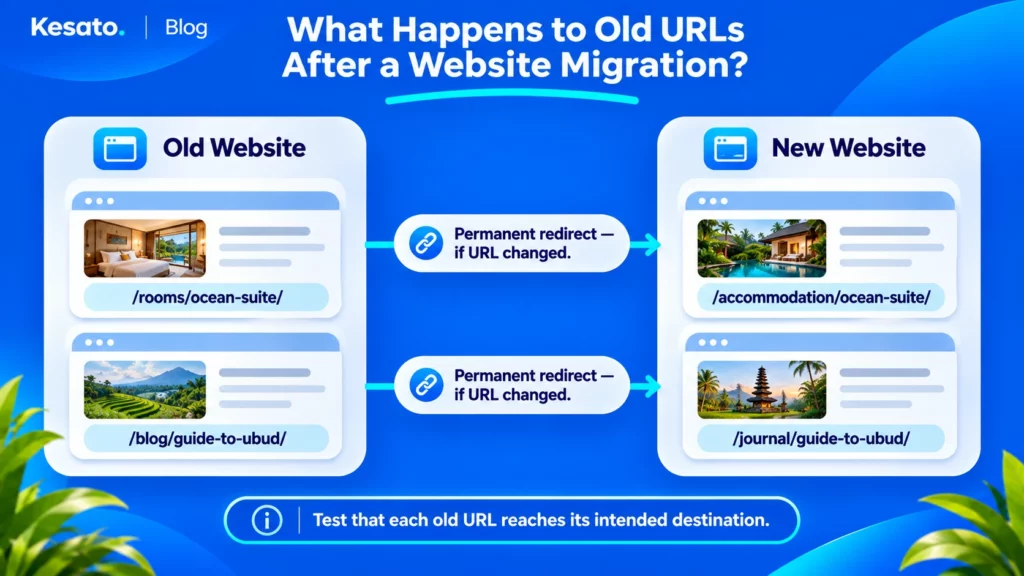
Google recommends server-side permanent redirects such as HTTP 301 or 308 for permanent URL moves.
That does not mean every old URL should redirect to the homepage. If there is no relevant replacement, the team should decide how to handle the removed content appropriately, including a genuine 404 or 410 response when applicable.
Before launch, ask your team to:
- Create an inventory of existing URLs.
- Record which pages remain unchanged and which receive new URLs.
- Define suitable destinations for changed URLs.
- Test redirect behaviour and avoid unnecessary redirect chains.
- Update internal links to use the intended new addresses.
- Review canonical signals and sitemaps after the change.
- Document intentionally removed pages.
If the domain itself changes, the team may need additional Search Console and domain-migration checks. The exact procedure depends on the type of move.
Google’s site migration documentation explains the recommended process and why old redirects may need to remain in place for a substantial period.
Do not promise that a migration will preserve every ranking or avoid all traffic fluctuation. The practical objective is to protect valuable content and prevent avoidable implementation errors.
What Should Your Developer Show You Before You Approve the Launch?
When the development team says the website is ready, ask what has been tested.
A completed design review is not the same as technical sign-off. A statement such as “SEO is done” is also difficult to evaluate without knowing which requirements were included.
Ask for Evidence, Not Just a Completed Checklist
You do not need a complicated technical report. A practical handover can identify:
- The requirement that was checked.
- Which pages or systems were tested.
- Whether the result passed, failed or still needs review.
- The evidence supporting the result.
- Who owns the next action.
- Any remaining risk that needs the owner’s decision.
For example, the SEO specialist might provide a reviewed list of important URLs and their intended indexing settings.
The developer could demonstrate that the CMS permits authorised content updates and that the agreed redirects behave correctly in a suitable test environment.
For a migration, the team should also provide the old-to-new URL mapping and explain how it will be verified after deployment.
Some launch checks can only be completed on the public website. These should be scheduled as production acceptance tests rather than marked as passed prematurely.
Confirm Website Functions and Tracking
Search readiness is not enough if the website cannot support essential business activity.
Ask for testing of the actions that matter to your business:
- Contact and enquiry forms.
- Booking and reservation pathways.
- Important buttons, navigation and outbound links.
- Purchase or payment functions, where relevant.
- Analytics events used for important business reporting.
For hotels and villas, the booking provider may operate on a separate domain. Your team should verify whether analytics can correctly measure the intended journey across systems, subject to platform capabilities and applicable consent requirements.
Google Analytics provides guidance for cross-domain measurement when a visitor moves between different domains.
A booking-button click should not automatically be reported as a completed reservation.
If you’re working on a hospitality website, Kesato’s hotel website conversion checklist provides a more detailed guide to testing the direct-booking journey.
For any website, make sure test events are separated from real business activity where practical. Confirm that essential tracking works and that important actions are not being counted twice.
If a vendor controls part of the process, record what can be tested internally and what requires vendor support.
What Needs to Happen When the Website Goes Live?
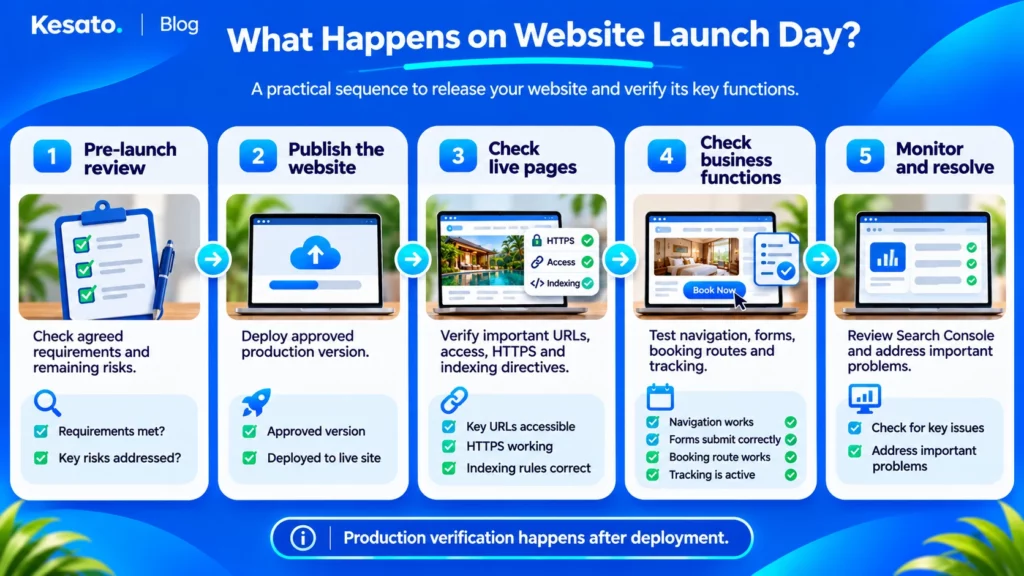
Launch day is when the team must verify the actual public website.
Tests performed on staging are valuable, but production can behave differently. Hosting settings, domains, robots directives, caching and external integrations may change during deployment.
Verify the Live Website, Not Just the Test Version
Once the new version is public, the team should check:
- The intended domain and secure HTTPS pages load correctly.
- Important public pages return the expected response and display the correct content.
- Staging restrictions have not been carried into production.
- Robots directives match the intended indexing policy.
- Canonical references use the appropriate live URLs.
- Navigation, internal links, forms and booking actions work.
- Changed URLs redirect correctly, where a migration requires them.
- Analytics receives suitable production data without unexpected duplicates.
If the team identifies a significant problem, assign responsibility immediately and use the project’s agreed recovery or rollback procedure where appropriate.
A launch should include an agreed way to respond to critical failures, not just a plan to publish the files.
Check Search Console, Sitemaps and Important URLs
Google Search Console is useful for reviewing how Google sees your website.
Verify that the responsible team has access to the correct property and can monitor the intended live website.
For representative important URLs, use URL Inspection to review available indexing information and perform live checks.
The Google Search Console URL Inspection tool can help determine whether a live URL appears accessible for indexing and reveal certain technical issues.
However, a successful live inspection does not guarantee that the page will be indexed. The tool also does not test every factor that can affect inclusion in Google Search.
Check the sitemap where applicable, confirm that it references appropriate production URLs and submit or update it through the agreed Search Console process.
Google may still take time to discover, crawl and process new or changed pages.
The immediate launch objective is to confirm that the intended live configuration is correct, not to demand rankings on publication day.
How Do You Know Everything Is Still Working After Launch?
Website launch is a milestone, not the end of technical verification.
A page may work correctly immediately after deployment and develop problems after a configuration update, content change or integration issue.
For website migrations, Google also needs time to process changed URLs and signals. Temporary search fluctuations can occur even when you handle the move carefully.
Check for Indexing and Website Errors
During the initial period after launch, review the website regularly according to the project’s size and risk.
Important checks include:
- Page Indexing and URL Inspection information in Search Console.
- Unexpected noindex rules or crawling restrictions.
- 404 errors on important pages and failed redirects.
- Canonical selections that differ from the intended setup.
- Internal links pointing to obsolete URLs.
- Problems affecting forms, booking systems or important integrations.
For a migration, compare the status of important old and new URLs against the agreed mapping.
Do not assume that every excluded page represents an error. Some pages should intentionally remain out of Google’s index, and some URLs may be treated as duplicates.
Investigate unexpected changes and prioritise problems that affect important public content.
Review Traffic, Leads and Bookings Without Jumping to Conclusions
Use the available baseline to review search performance and business actions.
For an established website, compare important landing pages, organic traffic patterns and relevant conversions before and after the move.
For a newly launched website, begin establishing a baseline rather than measuring against a history that does not exist.
Remember that performance can also be affected by seasonal demand, advertising, content changes, competition and changes to the business itself.
A short-term traffic decline during migration does not automatically prove that a redirect is broken. Equally, a successful technical test does not prove that every important search signal has already been processed.
When there is a significant change, investigate it with the SEO and development teams using page-level evidence.
Keep the process practical: identify the issue, assign the owner, verify the correction and document the result.
Is Your Website Ready to Launch, or Should You Fix Something First?
Not every issue discovered before launch has the same urgency.
An important public page accidentally blocked from indexing deserves a different response from a minor formatting inconsistency on a noncritical page.
Your team should classify the findings according to the consequences for visitors, search accessibility and essential business functions.
Know Which Problems Should Delay Launch
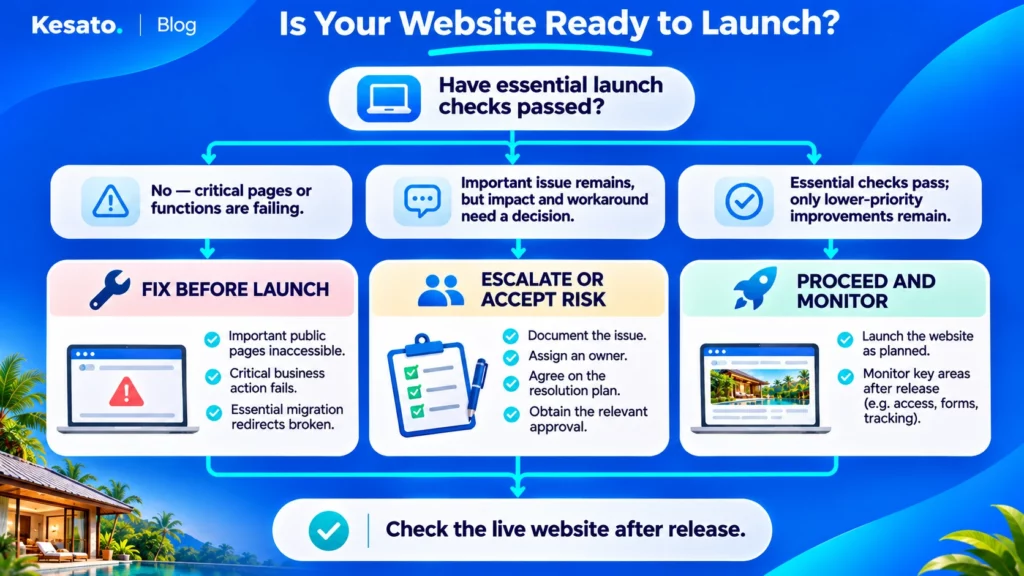
Use the following decision guide as a starting point.
| Decision | Example | Owner action |
|---|---|---|
| Fix before launch | Important public pages are inaccessible, critical functionality fails, or essential migration redirects are broken | Delay approval until the issue is corrected and retested |
| Escalate or accept the risk | A significant but noncritical issue remains, with a workable plan and understood consequences | Request a clear explanation, responsible person and agreed resolution plan |
| Proceed with monitoring | Essential requirements pass, with only lower-priority improvements outstanding | Approve launch under the agreed plan and continue monitoring |
These categories are a practical business decision framework, not official Google launch classifications.
The same issue can have different consequences for different websites. A broken booking engine may be critical for a resort. An incorrectly configured product checkout may be critical for an online store.
Similarly, an SEO-related concern should be assessed based on its actual effect rather than automatically treated as an emergency.
Record Remaining Risks and Responsibilities
Before providing final approval, ask for a short launch summary covering:
- Which critical checks have passed.
- Which issues remain open.
- What risks the business has accepted.
- Who is responsible for each remaining action.
- How the website will be checked after launch.
- What happens if an essential function fails.
This gives the business a clear reference when reviewing the launch later.
Most importantly, it reduces the chance that the owner assumes something has been tested while the developer or SEO specialist believes it was outside their scope.
Final Takeaway: Don’t Approve a Website Launch Based on Design Alone
A new website should be reviewed for more than its appearance.
Before giving final approval, make sure the important pages are ready, search engines can access the public content as intended, and the team has tested the functions customers depend on.
If the project replaces an existing website, review valuable pages and changed URLs before publishing. Ask your developer and SEO specialist to explain what will happen to the old addresses and how the migration will be checked.
After launch, verify the production website and continue monitoring. Google’s discovery and indexing processes are not immediate, and a completed checklist cannot guarantee rankings.
The most useful question for an owner is simple: What evidence shows that our website is ready, and who will resolve the problems we find?
If you’re planning a new website or replacing an existing one, search visibility, technical requirements and business tracking are worth considering from the beginning. Explore Kesato’s web design and development services to understand how website development and SEO can be planned together.
Frequently Asked Questions
What SEO Checks Should Be Done Before Launching a Website?
Check that important public pages are accessible, have appropriate indexing settings, contain the intended content, use suitable URLs and have working internal links. Review metadata, canonical signals, sitemaps, mobile usability and relevant structured data. If existing URLs are changing, also prepare and test a redirect plan. Verify business functions and measurement before approval.
Can a Website Lose Google Rankings After a Redesign?
Yes. Changes to URLs, content, indexing settings, internal links and other search signals can affect visibility. Google also notes that rankings may fluctuate during a site move. A planned migration helps reduce avoidable errors, but no checklist guarantees that rankings will remain unchanged.
Should My Developer or SEO Specialist Handle the Launch Checklist?
Both may need to be involved. The SEO specialist should help define and verify search requirements, while the developer implements and tests the technical changes. The owner or project manager should confirm responsibilities, acceptance criteria and unresolved risks. The division may differ depending on the team and website.
How Long Does It Take for a New Website to Appear on Google?
There is no fixed timeframe. Google must discover, crawl and assess the website, and indexing is not guaranteed. A sitemap and URL Inspection can assist discovery and troubleshooting, but they cannot promise immediate visibility. Monitor the website through Search Console and investigate technical restrictions if important pages remain inaccessible.
Do I Need an SEO Checklist if My Website Uses WordPress?
Yes. WordPress and SEO plugins can help manage page settings, but they don’t automatically conthat the live website is configured correctly. Check page accessibility, intended indexing settings, URLs, content, internal links, mobile usability and relevant business functions. The exact checks depend on your theme, plugins, hosting and development setup.
Editorial note: This website launch checklist is an educational synthesis of public Google Search guidance and practical project-review principles, prepared with AI-assisted editorial support. It is not a website-specific technical audit or a guarantee of indexing, rankings or business performance.