
Key Takeaways
- Website design optimization starts with how people use your site, not how it looks. User experience design gives you a clear way to find and fix friction.
- Speed, mobile layout, navigation and visible calls to action affect both enquiries and search visibility.
- Google’s Core Web Vitals set measurable targets: LCP of 2.5 seconds or less, INP of 200 milliseconds or less, and CLS of 0.1 or less.
- Free tools such as GA4, Microsoft Clarity, PageSpeed Insights and Search Console show what to fix first.
- Clear page structure also helps AI search tools understand and cite your content.
A website can look modern and still lose visitors. Pages load slowly on mobile, the menu hides the page people want, or the enquiry button sits below 3 screens of text. Most of these problems are not visual. They are usability problems, and that is where user experience design comes in.
This guide explains what website design optimization involves in 2026, which tools help you measure it, and which fixes usually make the biggest difference.
Table of Contents
- What Does It Mean to Optimize Your Website Design?
- Why Does User Experience Design Affect SEO and AI Search?
- Which Tools Help You Find Website Design Problems?
- How Can You Optimize Your Website Design Step by Step?
- When Should You Redesign Instead of Optimize?
- Where Is the Best Place to Start?
- Frequently Asked Questions
What Does It Mean to Optimize Your Website Design?
Optimizing your website design means improving how the site works for the people using it, so more visitors find what they need and take action. It covers layout, speed, navigation, content structure and accessibility.
User experience design (UX design) is the process behind this. Instead of changing colours or fonts based on taste, it starts from how real visitors behave: where they click, where they stop scrolling and where they leave. User interface design (UI design) then shapes the visual layer, such as buttons, typography and spacing, so the experience feels clear and consistent.
Why Does User Experience Design Affect SEO and AI Search?
Search engines favour pages that are fast, stable and easy to use. Google’s Core Web Vitals measure 3 parts of this.
| Metric | What It Measures | Good Score |
|---|---|---|
| Largest Contentful Paint (LCP) | How fast the main content loads | 2.5 seconds or less |
| Interaction to Next Paint (INP) | How quickly the page responds to a tap or click | 200 milliseconds or less |
| Cumulative Layout Shift (CLS) | How much the layout moves while loading | 0.1 or less |
Google also uses mobile-first indexing, which means the mobile version of your site is the one it mainly evaluates.
AI search tools such as ChatGPT, Perplexity and Google AI Overviews add another layer. They draw answers from pages that are clearly structured, with descriptive headings, short direct answers and clean HTML. A site built on good user experience design is usually easier for both people and AI systems to read.
Which Tools Help You Find Website Design Problems?
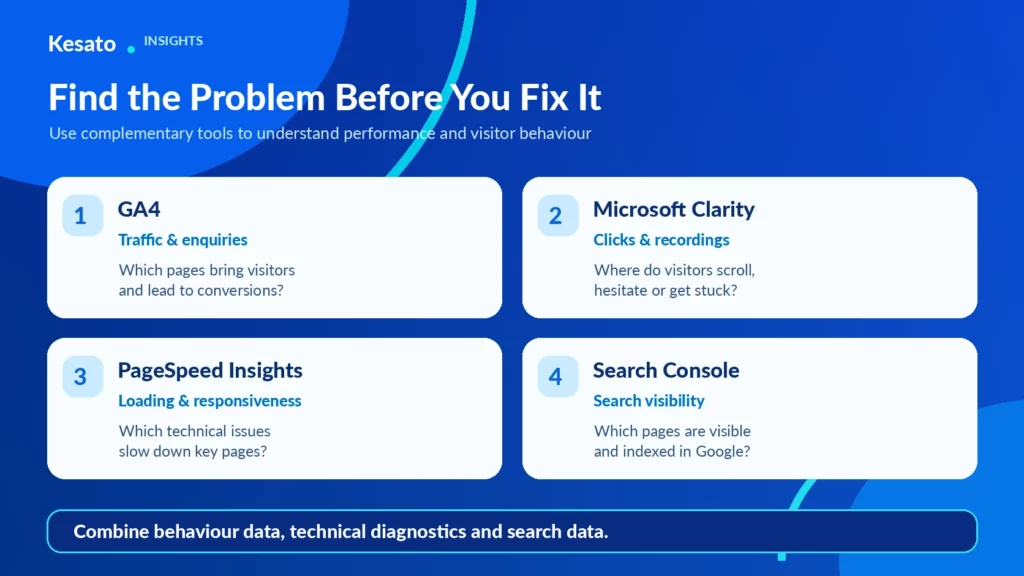
These tools cover most of what a business website needs.
- Google Analytics 4 (GA4): shows which pages get traffic, how visitors move through the site and where enquiries come from.
- Microsoft Clarity: free heatmaps and session recordings that show where visitors click, scroll and get stuck.
- Hotjar or Crazy Egg: paid alternatives with heatmaps, on-page surveys and testing features.
- Google PageSpeed Insights: tests Core Web Vitals and lists specific speed fixes.
- Google Search Console: flags indexing, mobile usability and page experience issues.
How often should you review your website design? At least once a year, and after any major change such as a new service, a new market or a noticeable drop in enquiries.
How Can You Optimize Your Website Design Step by Step?
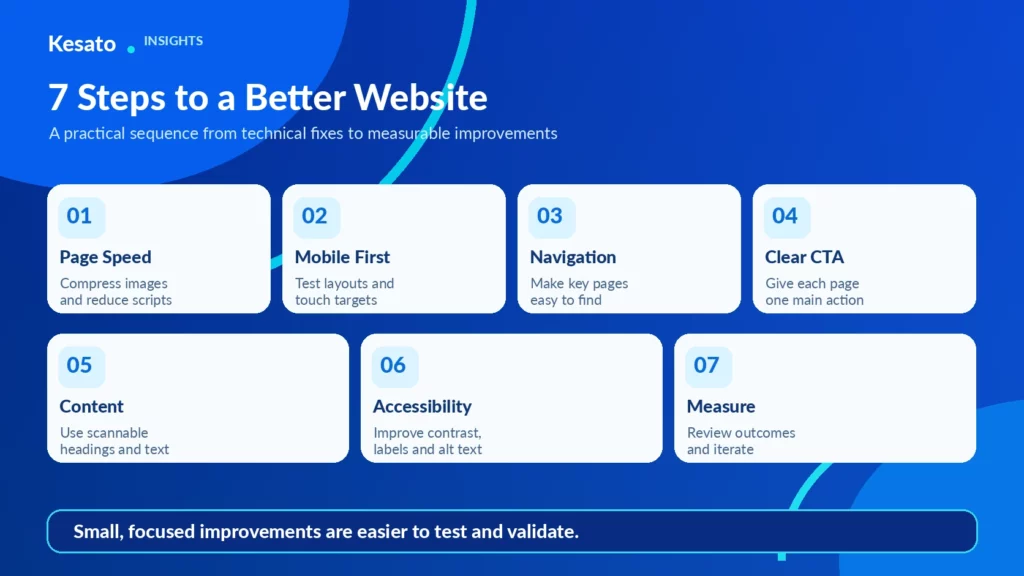
1. Fix Page Speed First
Compress images and serve them in WebP format, lazy-load images below the fold, and limit heavy third-party scripts such as chat widgets and review plugins. A slow page undoes every other improvement.
2. Design for Mobile Before Desktop
Check every key page on a phone. Keep body text at 16px or larger, make buttons easy to tap (around 48px high), and make sure nothing scrolls sideways.
3. Make Navigation Obvious
Keep the main menu to around 5 to 7 items and use the words visitors actually search for, such as “Services” or “Contact,” rather than internal names. Add breadcrumbs on deeper pages.
4. Give Every Page 1 Clear Call to Action
Each page should have 1 main action, such as booking, sending an enquiry or starting a WhatsApp chat. Place it where it is visible without scrolling on mobile, and repeat it at the end of the page.
5. Structure Content for Scanning
Use question-based headings, short paragraphs, lists and tables. This helps visitors find answers quickly and helps AI tools extract the right information from your page.
6. Check Accessibility
Aim for a colour contrast ratio of at least 4.5:1 for normal text, as recommended by WCAG. Add descriptive alt text to images and clear labels to every form field.
7. Test, Measure and Repeat
Change 1 element at a time, then compare results in GA4 over 2 to 4 weeks.
When Should You Redesign Instead of Optimize?
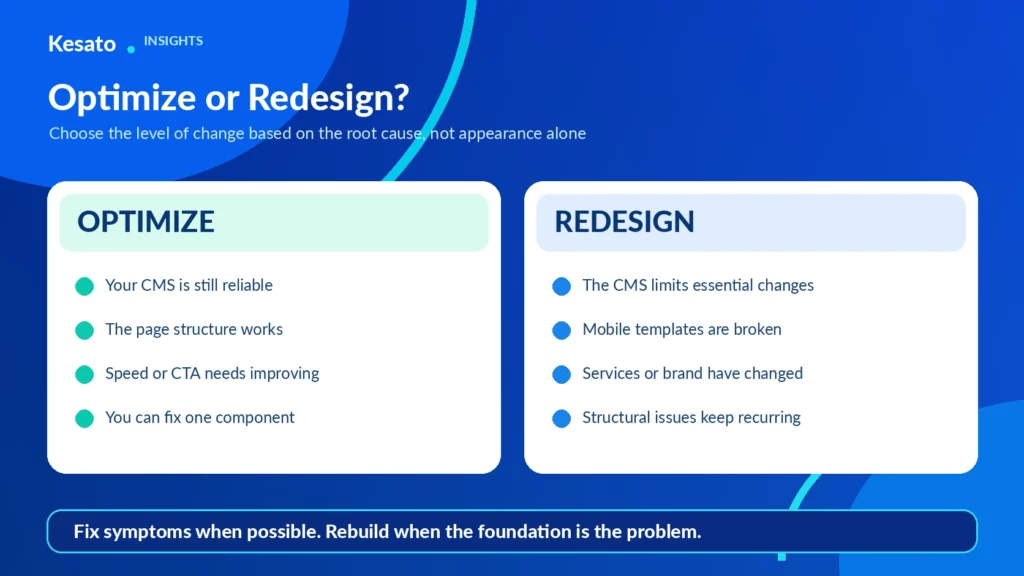
Optimization works when the site’s foundation is sound. A redesign makes more sense when the CMS is outdated and hard to edit, the mobile layout is broken at the template level, the brand has changed, or the site is built around services you no longer offer.
When we review websites at Kesato, the deciding question is usually whether fixes are treating symptoms of a deeper structural problem. If they are, professional website design services that plan design and development together tend to save time compared with patching an old build.
Where Is the Best Place to Start?
Start with the pages that bring in enquiries, usually the homepage, main service pages and contact page. Run them through PageSpeed Insights, watch a few Clarity recordings, and note where visitors hesitate. Those notes become your first list of fixes.
At Kesato, our team in Bali works on websites for hotels, villas, property agencies and other businesses where the website is the main source of enquiries. Because user experience design, development, SEO and tracking sit within one team, a website review looks at the full path, from the first search result to the enquiry form, rather than the visuals alone. If you would like Kesato to review how your site is performing, get in touch with our team.
Frequently Asked Questions
What is the difference between UI and UX design?
UX design covers how a website works and how visitors move through it. UI design covers the visual elements, such as buttons, typography, colour and layout.
How long does website design optimization take?
Quick fixes such as image compression can take a few days. Larger changes to navigation or page layout usually take several weeks, including testing.
Does website design affect Google rankings?
Yes. Page speed, mobile usability and layout stability are part of Google’s page experience signals, and better usability usually improves how visitors engage with your pages.
Do you need a full redesign to improve your website?
Not always. If the structure and CMS are sound, focused improvements to speed, navigation and calls to action often deliver results faster than a redesign.