

Key takeaways
- SEO ROI measures business value, not just rankings or traffic.
- Use GSC for search visibility, GA4 for website actions, and CRM for sales outcomes.
- Verify qualified leads and revenue before calculating financial returns.
- Compare SEO costs with attributable value, and account for profit margins.
Your website is gaining organic traffic. Keywords are improving, and Google Search Console shows more clicks. But how much business is SEO actually generating?
For many business owners, that question is difficult to answer. Search performance reports show visibility, while Google Analytics tracks website activity. Actual enquiries, confirmed bookings and sales may sit in different systems.
To measure SEO ROI, you need to understand how those records relate to one another.
This guide explains how to use Google Search Console (GSC), Google Analytics 4 (GA4) and CRM data to evaluate SEO performance. You will also learn how to calculate returns, identify attribution gaps and decide what to improve next.
We will use a hypothetical Bali hotel to demonstrate the calculations. The method also applies to service businesses that depend on qualified enquiries rather than immediate online purchases.
Table of contents
- What Does SEO ROI Actually Measure?
- Use Google Search Console to Measure Organic Discovery
- Use GA4 to Track Organic Traffic and Lead Actions
- Verify Qualified Leads and Sales in Your CRM
- Connect GSC, GA4 and CRM Without Overclaiming Attribution
- How to Calculate SEO ROI: A Bali Hotel Example
- SEO Measurement Maturity Matrix
- Monthly SEO Decision Scorecard
- Final Takeaway
- Frequently Asked Questions
What Does SEO ROI Actually Measure?
SEO return on investment (ROI) compares the financial value associated with SEO against the cost of achieving it.
The challenge is identifying which results can reasonably be attributed to organic search.
Better rankings can increase visibility. More organic traffic can create opportunities. However, neither automatically proves that your business gained customers or generated profit.
SEO Performance vs. Business Outcomes
SEO measurement works across several levels:
- Search visibility: How often relevant pages appear in Google Search and receive clicks.
- Website engagement: How visitors interact with your website after arriving.
- Lead generation: How many visitors successfully submit enquiries or complete other defined lead actions.
- Lead quality: How many enquiries meet your business’s criteria for a potential customer.
- Commercial outcomes: How many qualified opportunities become actual sales or confirmed bookings.
Each level answers a different business question.
For example, a Bali resort may rank for searches related to private pool villas. That helps travellers discover the property. But the hotel still needs to understand whether visitors enquire, book and complete their stays.
These distinctions matter when comparing SEO with other channels. Kesato’s article on measuring social media ROI discusses a related financial question, but the tracking sources and attribution challenges differ.
Revenue-Based Return vs. Profitability
A common SEO return calculation compares attributed revenue with SEO spending:
Revenue-based return (%) = ((Attributed revenue – SEO cost) / SEO cost) × 100
This is a useful comparison of revenue against investment. However, revenue is not profit.
Hotels still have operating costs associated with delivering a stay. Other businesses may have product costs, transaction charges or service delivery expenses.
For a more meaningful profitability assessment, use contribution after relevant variable costs but before SEO spending:
Margin-adjusted SEO ROI (%) = ((Attributable contribution – SEO cost) / SEO cost) × 100
Make sure SEO expenses are not deducted twice. You also need reliable attribution and consistent reporting periods before treating either result as an actual business outcome.
Use Google Search Console to Measure Organic Discovery
Google Search Console is the starting point for understanding how your website performs in Google Search.
It provides information about search queries, landing pages, impressions, clicks, click-through rate and average position.
These metrics describe search visibility and clicks from Google’s search results. They do not reveal which visitors later became qualified customers.
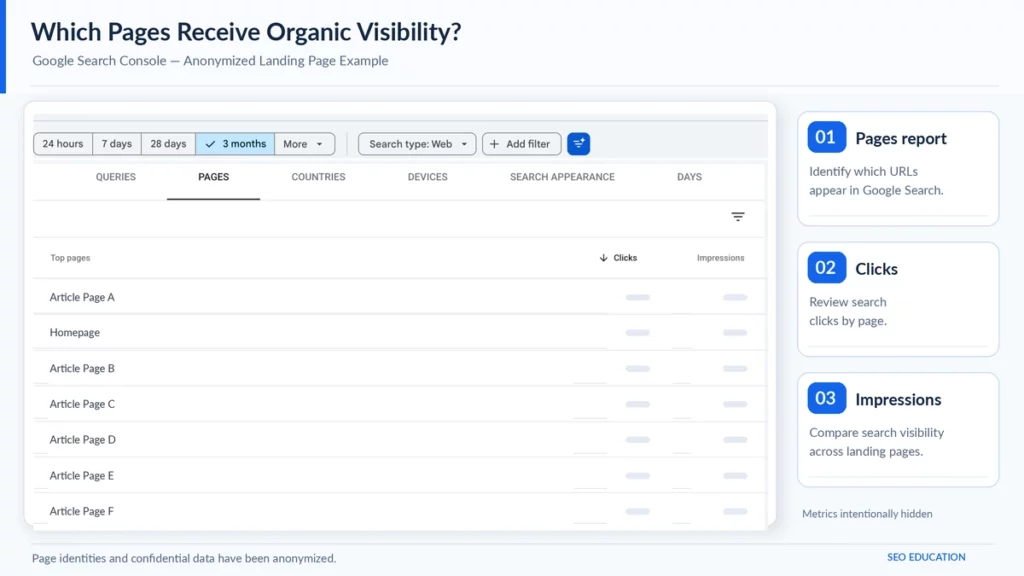
Find Relevant Queries and Landing Pages
To review your search performance:
- Open your verified property in Google Search Console.
- Go to Performance > Search results.
- Choose a consistent date range and an appropriate search type.
- Open the Queries tab to identify relevant searches.
- Open the Pages tab to see which URLs appear and receive clicks.
- Use filters to examine important pages, countries or devices.
For a hospitality business, separate branded searches from relevant discovery searches where possible.
Someone searching for your hotel’s exact name may already know the property. A traveller searching for a particular accommodation experience could represent a different discovery opportunity.
Both matter, but they should not always be interpreted in the same way.
Google explains these metrics and dimensions in its Search Console Performance report documentation.
The following examples show how Google Search Console reports can help identify search visibility and landing-page performance. The screenshots have been anonymized to protect business information. These metrics are useful starting points, but they do not directly measure qualified leads or revenue.
Record Your Search Performance Baseline
Record the results for the same group of pages and search market over time.
Useful baseline information includes:
- Search clicks and impressions.
- Relevant queries and their associated pages.
- Branded versus non-branded search patterns, where identifiable.
- Performance by country and device.
- Changes in visibility for commercially important landing pages.
Compare similar reporting windows. Note any seasonal changes, website migrations or major campaigns that could affect the results.
Do not treat an increase in average ranking position as an increase in SEO ROI. Search visibility is an important early signal, but it is only the first measurement layer.
Use GA4 to Track Organic Traffic and Lead Actions
Search Console explains how visitors discover your website through Google Search. GA4 helps you understand what happens after they arrive.
Start by identifying relevant organic sessions. Then check whether those sessions produce meaningful actions.
Isolate Google Organic Search Traffic
In Google Analytics 4:
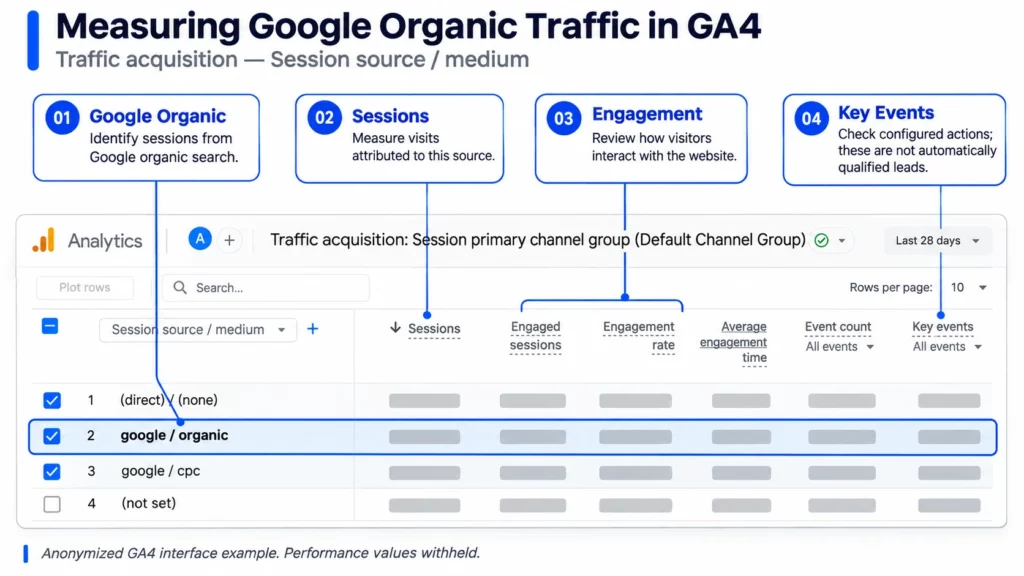
- Open Reports > Acquisition > Traffic acquisition.
- Review the Organic Search channel to understand organic traffic across search engines.
- To focus specifically on Google, use the Session source / medium dimension and find google / organic.
- Review sessions, engagement and available key-event metrics.
- Use the Landing page report, where available, to investigate which entry pages contribute to those actions.
The distinction between Organic Search and google/organic matters. The first can include multiple search engines; the second narrows the analysis to Google traffic attributed to that source and medium.
Report layouts can vary with your GA4 configuration. Google’s Traffic acquisition guide explains the report and source dimensions.
The GA4 Traffic acquisition report helps identify sessions from Google organic search and evaluate website activity. Key events must be configured and validated before they can support lead or revenue reporting. Screenshot anonymized for educational purposes.
Track Successful Lead Submissions
Next, verify which website actions are being recorded as leads.
Google recommends the generate_lead event when a visitor submits a form or requests information. For lead-generation businesses, other recommended events include qualify_lead and close_convert_lead.
These events are not automatically populated with your sales outcomes. They require appropriate implementation.
For example, clicking a WhatsApp button shows that a visitor attempted to open a conversation. It does not prove they sent a message or became a qualified lead.
Similarly, a form-submit button click may happen even if validation fails. A successful lead submission should be measured at a reliable completion point.
Review the event setup, test it, and confirm the expected behavior using GA4 DebugView or another suitable validation method.
Google documents these definitions in its recommended events reference.
If the hotel uses a booking engine on a separate domain, check whether the guest journey can be measured across both systems. Google’s cross-domain measurement guidance explains the configuration requirements and limitations.
Verify Qualified Leads and Sales in Your CRM
A tracked enquiry is not automatically a qualified lead.
This is where CRM, reservations or sales records become important. They provide the business context that website analytics may not have.
Define What Counts as a Qualified Lead
Start by agreeing on clear qualification criteria with the sales or reservations team.
For a Bali hotel, a qualified enquiry might include a valid travel date, suitable guest requirements and genuine interest in an available room or package.
For another service business, qualification could depend on project requirements, budget fit or the ability to serve the prospective customer.
Use definitions that reflect your actual business. Do not assume every form submission or phone call represents an equivalent sales opportunity.
Review:
- Successful enquiries received during the reporting period.
- Records that meet the agreed qualification criteria.
- Duplicate, irrelevant or unqualified enquiries.
- Opportunities that progress to a confirmed business outcome.
Where suitable integrations exist, CRM milestones can also be sent to GA4 using relevant lead-generation events. Google’s Lead acquisition report uses these events to report lead-related activity.
However, the report is only as reliable as the events being implemented. It does not replace the business’s CRM or operational records.
Connect Lead Records to Confirmed Business Outcomes
The next step is to reconcile qualified leads with actual customers or bookings.
For hospitality, distinguish a booking enquiry from a reservation confirmation. Also account for cancellations, refunds and the difference between booking value and realised revenue.
Use an agreed attribution method and a documented record-matching process where permitted.
The process might involve a CRM lead identifier, original landing-page information, recorded channel attribution and a corresponding reservation record. This requires appropriate technical setup and privacy controls.
Do not send names, email addresses or other prohibited personally identifiable information into GA4.
If the hotel cannot reliably match records, report what is known: organic sessions, verified enquiries and qualified leads. Treat revenue attribution as incomplete until the supporting evidence exists.
Connect GSC, GA4 and CRM Without Overclaiming Attribution
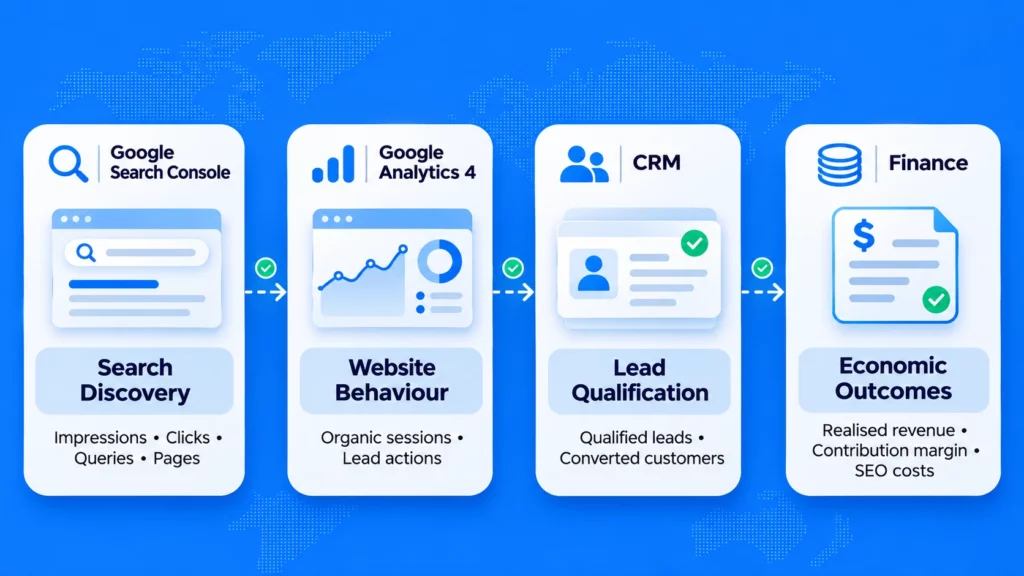
GSC, GA4 and CRM should be understood as different measurement systems.
Search Console measures Google Search activity. GA4 measures website behaviour and configured events. CRM systems record customer qualification and sales processes.
Bringing their reports together helps build a clearer performance picture, but it does not automatically create a complete customer-level journey.
Why GSC Clicks and GA4 Sessions Differ
A Search Console click and a GA4 session are not the same measurement.
One person might click a Google result more than once during a session. Some visits may not be measured in GA4 because of consent choices, tagging issues or browser restrictions.
Search Console also groups certain search data by canonical URL, while Analytics records activity on tagged pages according to its own measurement rules.
Google explicitly explains these differences in its guide to using Search Console and Google Analytics data together.
The goal is not to force the totals to match exactly. Instead, compare their trends and investigate unusually large differences.
Understand Attribution and Data Gaps
Attribution determines how credit is assigned to marketing touchpoints.
A traveller might discover a hotel through Google Search, return through social media and later book by entering the website address directly. The outcome credited to organic search can depend on the attribution method and available data.
GA4 includes attribution reporting options such as data-driven attribution and last-click models. These can produce different views of channel contribution.
Before presenting SEO-attributed revenue, document:
- Which attribution model was used.
- Which channel or session dimensions were analysed.
- Which event or business outcome was counted.
- The reporting period and any conversion delay.
- How CRM or booking records were reconciled.
- Which outcomes remain untracked or uncertain.
See Google’s attribution documentation for information about how conversion credit is assigned.
Connecting Search Console to GA4 does not identify the exact search keyword that produced each individual customer. Also, attributed conversions are not proof that SEO alone caused the sale.
These limitations should appear in the report rather than being hidden behind a single ROI percentage.
How to Calculate SEO ROI: A Bali Hotel Example
Consider a hypothetical boutique hotel in Bali that invests in SEO over a defined reporting period.
Assume the hotel has sufficiently reliable data to attribute Rp30 million in realised revenue to organic search under its chosen attribution method.
Its relevant contribution margin before SEO expenses is 40%, while total SEO investment is Rp8 million.
Illustrative inputs:
- Attributed realised revenue: Rp30,000,000.
- Contribution margin before SEO cost: 40%.
- Contribution before SEO cost: Rp12,000,000.
- Total SEO investment: Rp8,000,000.
These are fictional numbers used solely to explain the calculation. They are not Kesato client results or typical Bali hotel benchmarks.
Calculate Revenue-Based Return
First, compare attributed revenue against SEO investment:
((Rp30,000,000 – Rp8,000,000) / Rp8,000,000) × 100 = 275%
This revenue-based comparison shows that attributed revenue exceeds SEO investment. However, it does not account for the cost of delivering the hotel stays.
Therefore, the 275% result should not be described as the hotel’s net profit ROI.
Calculate Margin-Adjusted SEO ROI
Next, calculate the contribution remaining after relevant variable operating costs:
Rp30,000,000 × 40% = Rp12,000,000
Then subtract SEO investment and divide by the same investment:
((Rp12,000,000 – Rp8,000,000) / Rp8,000,000) × 100 = 50%
The illustrative net contribution after SEO spending is Rp4 million.
In this example, the margin-adjusted SEO ROI is 50%. The calculation assumes that revenue attribution is sufficiently reliable, the contribution definition is correct and SEO costs have not been deducted twice.
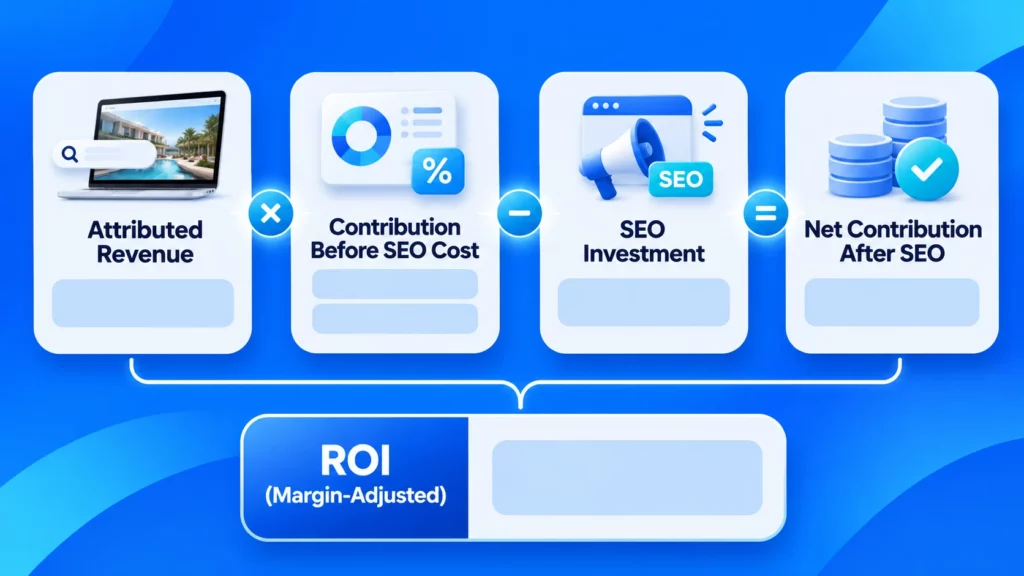
The difference between 275% and 50% illustrates why a business should define what it means by ROI before evaluating its agency or marketing investment.
If the required financial or attribution data is unavailable, do not replace it with an invented estimate. Use qualified lead metrics until a defensible financial calculation becomes possible.
What If Your Data Is Incomplete? The SEO Measurement Maturity Matrix
Not every business has a connected CRM, booking engine and financial reporting system.
That does not mean SEO cannot be measured. It means the conclusions should match the evidence available.
The following measurement maturity matrix is a practical editorial framework, not an official Google standard or proprietary Kesato methodology.
| Level | Available data | What you can measure |
|---|---|---|
| 1. Discovery | Google Search Console | Search visibility, clicks, queries and landing pages |
| 2. Engagement | GSC + GA4 | Organic sessions, website behaviour and configured actions |
| 3. Lead quality | GA4 + CRM | Verified enquiries and qualified leads, subject to reliable attribution |
| 4. Financial ROI | CRM + financial records | Attributable economic value compared with total SEO investment |
At Level 1, you can assess search discovery but cannot make credible financial ROI claims from clicks alone.
At Level 2, you can see how organic visitors interact with the website, provided the tracking is working.
Level 3 adds business qualification. Level 4 introduces reliable financial outcomes and costs.
Moving to a higher level requires better data, not simply more dashboard metrics.
A business may also have strong CRM records but weak source attribution. In that case, lead quality can be measured while the SEO-specific contribution remains uncertain.
Build a Monthly SEO Decision Scorecard
The purpose of an SEO report is to support decisions.
Instead of listing every available metric, focus on what changed, why it matters and what needs attention.
Which Metrics Should You Review?
Use this simple monthly scorecard to connect measurement with action.
| Measurement | Key question | Recommended action |
|---|---|---|
| Visibility | Are relevant pages gaining search visibility? | Review query and page coverage |
| Traffic | Are organic visitors reaching useful landing pages? | Investigate intent and engagement |
| Lead generation | Are successful enquiries tracked correctly? | Validate events and form outcomes |
| Lead quality | Do enquiries meet business qualification criteria? | Review CRM stages and lead handling |
| Revenue | Can confirmed outcomes be reconciled? | Check attribution and sales records |
| Investment | Is the measured value sufficient relative to SEO costs? | Review costs, strategy and resource allocation |
Record the current period, a comparable previous period and any important context. Separate verified results from estimates.
For SEO, not every investment generates returns in the same month the work takes place. Content production, technical improvements and delayed enquiries can affect different periods.
Explain these timing differences instead of presenting short-term numbers as the complete outcome of the strategy.
Common SEO ROI Measurement Mistakes
Before sharing an ROI figure, check for these problems:
- Using rankings as revenue: Better positions do not prove commercial returns.
- Counting clicks as leads: Website visits and button clicks are not confirmed enquiries.
- Counting every enquiry as qualified: Qualification requires business criteria.
- Ignoring attribution limits: Not every customer journey can be reconstructed.
- Using revenue as profit: Gross sales do not include all delivery costs.
- Leaving out SEO costs: Agency fees, content, technical work, internal time and relevant tools should be considered consistently.
- Mixing reporting periods: SEO costs, enquiries and realised sales may occur at different times.
If the numbers cannot yet support a reliable financial ROI calculation, say so clearly.
A transparent report showing search progress, verified qualified leads and measurement gaps is more useful than a precise-looking percentage based on weak assumptions.
Final Takeaway: Measure Business Value, Not Just Rankings
SEO ROI is not a single metric you can take directly from Google Search Console.
It is an evaluation that brings together search performance, website behaviour, qualified leads, commercial outcomes and investment costs.
Start with the data you have. Verify each measurement step, document attribution limitations and improve the system where necessary.
For hotels and other service businesses, the most valuable SEO reporting shows not only whether people discover your website, but whether that discovery supports genuine business opportunities.
Businesses reviewing their approach can explore Kesato’s SEO and SEM services for additional context on the agency’s search-related work.
Frequently Asked Questions
Can You Measure SEO ROI Without a CRM?
You can measure organic search visibility, website sessions and verified lead actions without a CRM. However, calculating financial SEO ROI becomes harder without reliable sales or booking records. Use the outcomes you can verify and label revenue attribution as incomplete until supporting data is available.
What Is a Good SEO ROI?
There is no universal SEO ROI benchmark. A meaningful result depends on profit margins, total SEO costs, attribution quality, time horizon and business objectives. Use a consistent calculation and compare the return with your own financial requirements rather than relying on a generic industry percentage.
Can GA4 Identify Which Keyword Generated a Sale?
Not automatically. Search Console provides query-level search information, while GA4 measures website activity and attributed conversions. Linking the two tools does not create a direct customer-level connection between a specific search query and a completed sale.
How Long Should You Track SEO Before Evaluating ROI?
Review leading indicators regularly, but evaluate financial returns over a period appropriate to your sales cycle and SEO investment. Hotels should account for delays between search, enquiry, booking and realised revenue. Use comparable reporting periods and avoid assuming that every SEO improvement produces an immediate sale.
