
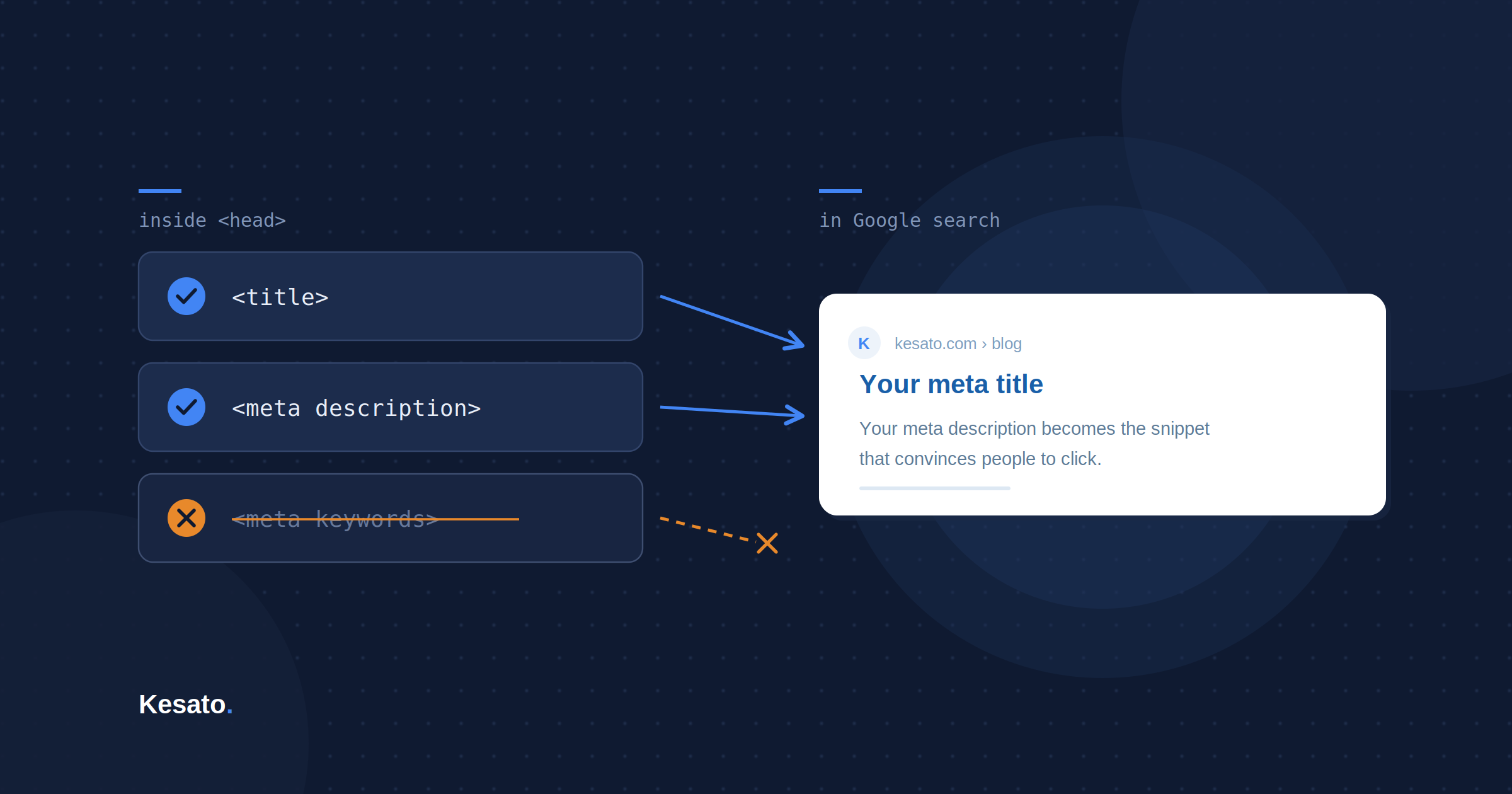
Meta keywords won’t move your Google rankings. Google confirmed that back in 2009, and nothing since has changed it. But the field still sits in some CMS setups, clients still ask about it, and the underlying question of how you pick the right keywords for a page is still very much alive.
This guide answers both: what to do about the tag itself, and where your keywords actually belong instead.
Two Different Things With the Same Name
If you searched your way here, you probably mean one of two things. Both are fair questions, but they have different answers.
The meta keywords tag itself
A single line of code in your page’s <head> section, written as <meta name="keywords">. This is what the phrase literally refers to. Google has ignored it since 2009, and for almost every site the right move is to leave it empty. The next two sections cover the evidence and the narrow exceptions.
The keywords you target for a page
The terms you research, then place in your title, description, headings, and content. Plenty of people call these “meta keywords” because they know keywords have something to do with meta titles and meta descriptions. They’re actually three separate tags. This second meaning is what genuinely affects rankings, and the second half of this guide covers it.
The good news: the process for choosing them is identical. The only thing that changed is where the results go.
What Meta Keywords Actually Are
Meta keywords are a short list of terms placed inside a page’s HTML <head>, meant to tell search engines what the page is about:
<meta name="keywords" content="meta keywords, seo meta tags, keyword optimization">
They’re invisible to visitors and live purely in your source code. That’s also where the confusion starts, because two tags that sit right next to them do matter:
- Meta title: the clickable headline in search results. The actual element is
<title>, and SEO plugins just label it “meta title.” - Meta description: the summary snippet below it, which influences click-through rate.
Meta keywords influence neither. It’s a separate, legacy tag: not a caption, not a ranking lever, and not something users ever see.
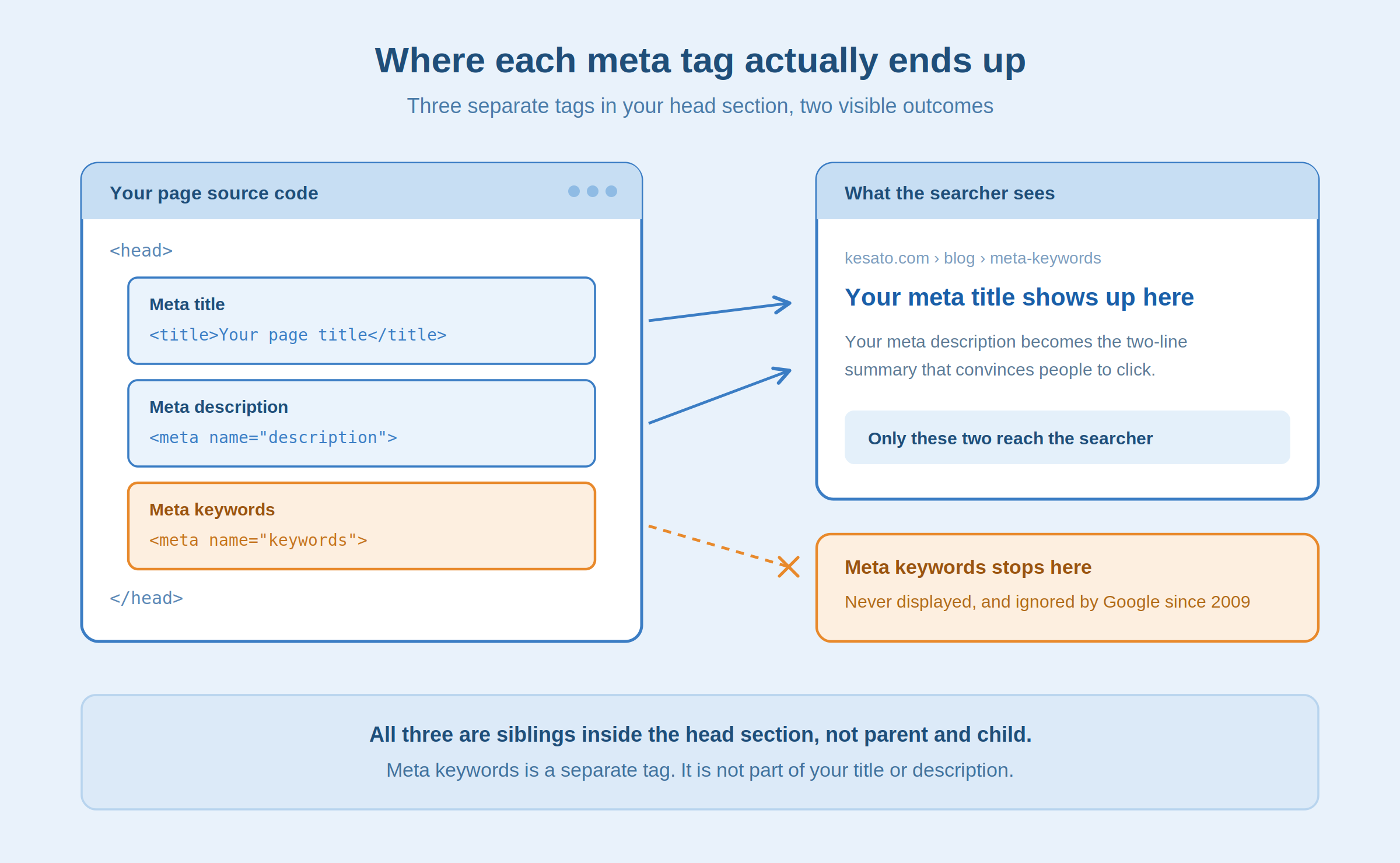
Quick answer: Meta keywords are a legacy HTML tag listing a page’s target terms. They’re invisible to users and ignored by Google, unlike the meta title and meta description, which both appear in search results.
Meta Keywords vs. Title vs. Description
| Tag | Visible to users? | Affects Google rankings? | Primary purpose |
|---|---|---|---|
| Meta keywords | No | No | Legacy indexing hint, internal tagging |
| Meta title | Yes, in the SERP | Yes | Click-through, relevance signal |
| Meta description | Yes, in the SERP | Indirectly, via CTR | Search snippet, click motivation |
If you only have time to optimise one of the three, it’s never the keywords tag. It’s your meta title, then your description.
Do Meta Keywords Still Affect Rankings?
No. In September 2009, Matt Cutts, then head of Google’s webspam team, published an official statement confirming Google does not use the meta keywords tag in web search ranking. That position hasn’t changed since. The tag was abandoned industry-wide after sustained keyword stuffing destroyed its value as a trust signal.
The other engines are worth being precise about, because a lot of SEO content overstates this part:
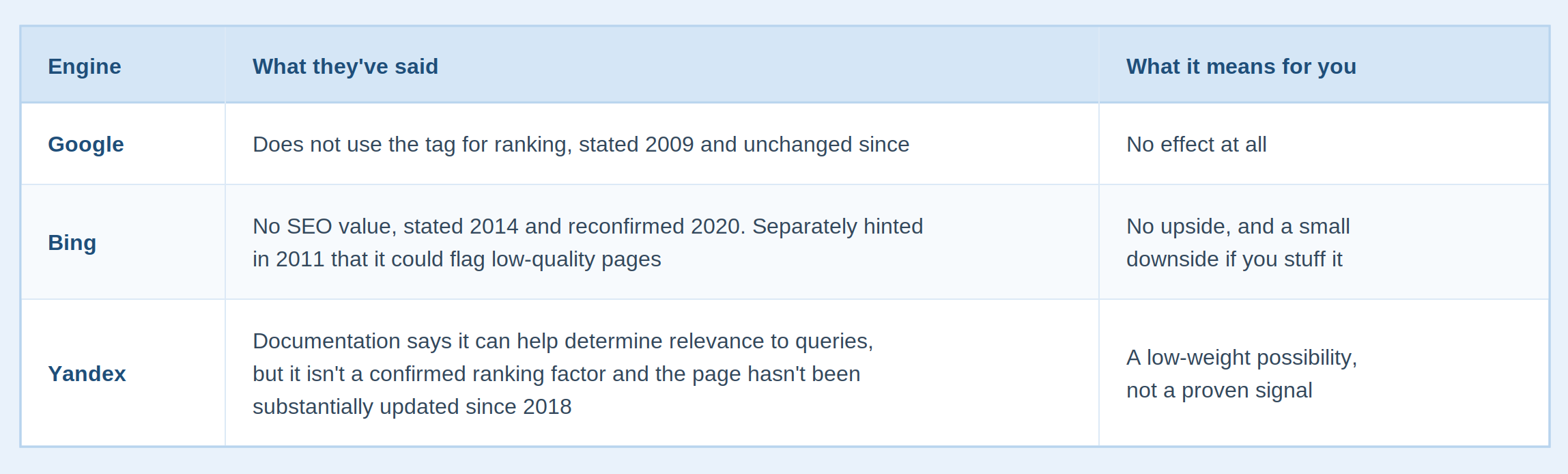
So the honest summary is narrower than most guides admit: for the overwhelming majority of sites, the tag does nothing.
Quick answer: No. Google has ignored the meta keywords tag since 2009, Bing treats it as worthless, and Yandex’s support is unconfirmed and undated since 2018.
When the Tag Is Still Worth Using
Three narrow cases where filling it in isn’t wasted effort:
- Non-Google traffic: if your analytics show real volume from Yandex, a short list is a cheap hedge. Check the number first, because for most English-language sites it’s a rounding error.
- Internal site search: some enterprise tools, including SharePoint and custom Elasticsearch setups, index the field to improve results within your own site. Real use case, but it’s internal search, not SEO.
- Legacy directories: a handful of industry-specific directories still parse the tag when indexing submissions. Verify before assuming, because most have moved on.
Outside these three, leave the field empty.
How to Choose the Right Keywords
Here’s the part that matters regardless of what you do with the tag. This is ordinary keyword research, and it will improve your titles, headings, and content whether or not the keywords tag ever gets filled in.
Step 1: Start from search intent
Before opening any tool, define what the page is for: informational, transactional, or navigational. Your keywords should reflect that intent, not just repeat your target phrase in different word orders.
Step 2: Pull real queries from research tools
Semrush’s Keyword Magic Tool, Google Keyword Planner, and your own Search Console query data will show you the phrases people actually use, not guesses.
Step 3: Favour short, page-defining terms
Concise, high-relevance terms of two to four words work best. Save full long-tail phrasing for headings and body copy, where it reads naturally.
Step 4: Check what’s ranking above you
Look at the top three results for your focus keyword. If your page doesn’t cover the same core subtopics, your keyword list and your content both need adjusting, starting with the content.
Step 5: Cap the list and never duplicate it
Five to ten genuinely relevant terms per page, and never copy-paste the same list across multiple URLs.
This is the same audit sequence our SEO services team runs before touching any client’s on-page structure, because skipping step one almost always produces a keyword list that looks right but targets the wrong intent.
Quick answer: Five to ten keywords per page is enough. More adds no benefit and increases the risk of the tag reading as spam.
A Worked Example: One Real Page
Theory is easy to agree with and hard to apply. Here’s the five-step process on a real page.
- URL:
/shoes/mens-running-shoes-black - Page content: a product category page selling black running shoes for men
- Focus keyword: men’s black running shoes
Applying the five steps
Intent. Transactional. The searcher wants to browse and buy, not read an article. That rules out informational phrases like “how to choose running shoes.”
Real queries. Running the focus keyword through a keyword tool and Search Console might surface:
men's black running shoes
black running shoes for men
mens running shoes black
running shoes men black
Short and page-specific. Drop anything vague like “shoes” or “running” alone. They’re too broad and belong on the parent category page.
SERP check. If top-ranking competitors also target “black athletic shoes men” and “black trainers men” as subtopics, those variants get added.
Capped list. Five final terms:
men's black running shoes
black running shoes for men
black athletic shoes men
running shoes men black
black trainers men
Notice what’s missing: no repeated words stacked for extra weight, no unrelated terms, and nothing copied from the site’s other shoe pages. Those get their own list, built the same way from their own query data.
Where Those Keywords Actually Go
This is the step most guides skip, and it’s the one that matters. You now have five terms. They don’t go into a keywords tag. Here’s where each one earns its place.
Meta title
Lead with the primary term, keep it under 60 characters:
<title>Men's Black Running Shoes | Free Returns | Brandname</title>
Meta description
Work in one or two variants naturally, under 155 characters. Write for the click, not the crawler:
<meta name="description" content="Shop black running shoes for men from top brands. Free shipping, free returns, and expert fitting advice on every pair.">
H1 and H2s
One H1 per page, matching the title’s intent without duplicating it word for word: Men’s Black Running Shoes. Subtopics from step 4 become your H2s: Black Trainers for Road vs. Trail, How to Choose Your Size.
Body copy and alt text
Variants appear where they read naturally. Alt text describes the image and happens to include the term: alt="black running shoes for men, side profile".
Internal link anchors
Anchor text pointing to this page uses the terms rather than “click here.”
That’s the whole answer to “how do I use my keywords.” Five terms, six placements, none of them the meta keywords tag.
Adding or Removing the Tag in WordPress
Most guides leave readers with a keyword list and nowhere to put it. The situation differs by plugin.
Yoast SEO
The field no longer exists. Yoast removed it in version 6.3 and has explained that the tag has no SEO value and can read as a spam signal when misused. There’s no toggle to bring it back. Yoast’s focus keyphrase is a different thing entirely. It’s an on-page analysis tool that outputs nothing into your HTML.
Rank Math
The field exists but is hidden by default. Go to Rank Math → General Settings → Titles & Meta, find Use Meta Keywords Tag, and toggle it on. A Meta Keywords field then appears in the Rank Math box on every post and page editor.
All in One SEO
Also off by default. Go to AIOSEO → Search Appearance → Advanced, set Use Meta Keywords to Yes, then save. The field appears in the editor afterwards.
Removing the ones you already have
In most cases, do it. There’s no ranking downside, and it stops publishing your keyword strategy in your page source where competitors can read it. The only exceptions are the three cases listed earlier. If you’re keeping the tag, audit for duplication first.
How to Audit the Tag Across Your Site
Checking one page is easy: open the page, view source, and search for name="keywords".
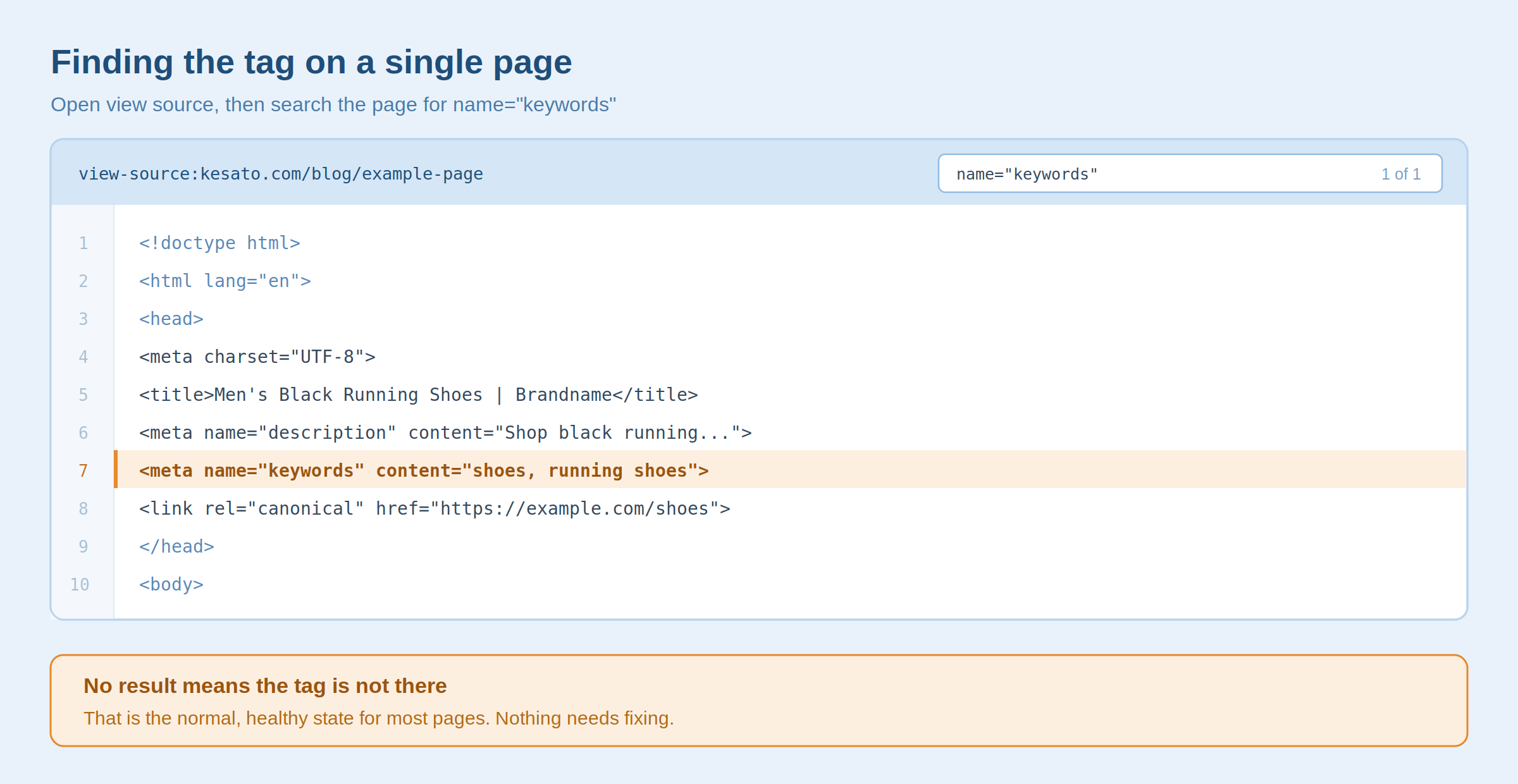
Checking a thousand pages needs a crawler. In Screaming Frog, go to Configuration → Custom → Extraction and add an XPath rule for //meta[@name='keywords']/@content. Run the crawl, then sort the extracted column. Two things usually surface:
- Identical lists across many URLs: the tag itself is harmless here, but duplicated lists are a reliable symptom of pages that overlap in topic, and that overlap does cause real problems in the SERP.
- Stale terms: keyword lists tend to outlive the pages they were written for.
The duplication pattern is the useful output. Meta keywords don’t cause cannibalisation, but they make it visible.
Common Mistakes That Waste Your Time
Even teams who know meta keywords don’t rank content still get this wrong:
- Keyword stuffing: cramming in every variation signals low quality to the platforms that still read the tag.
- Copy-pasting the same list sitewide: muddies topical clarity for crawlers and internal search, and usually reveals overlapping pages.
- Adding misspelled variants on purpose: a common suggestion, and a bad one. Search engines correct misspellings before they reach your page, and autocorrect means users rarely submit them anyway.
- Ignoring search intent: a keyword that matches your product but not what the searcher wants won’t help, tag or no tag.
- Confusing focus keyphrase with meta keywords: teams fill in the focus keyphrase and assume it publishes a keywords tag. It doesn’t, and never did.
- Overspending time on it: time perfecting a keywords list is time not spent on titles, headings, and content depth.
What Replaced Meta Keywords
The tag is legacy, but the discipline behind it, clearly signalling what each page is about, never went away. It moved into elements that actually get read: your title tag, your heading structure, your internal linking, and the clarity of the content itself.
That’s also what AI search tools like Google AI Overviews, ChatGPT, and Perplexity work from. They have no interest in a hand-declared keyword list, because they parse structure and substance. Google’s own guidance on AI features points the same direction: clearly authored, well-structured, fully crawlable content is what surfaces in generated answers.
The Short Version
Meta keywords won’t make or break your rankings, and for most sites the right move is to leave the field empty. But the research habit behind choosing them well still shapes how clearly your site tells search engines, and now AI models, what each page is for.
If your pages are competing with each other in the SERPs instead of with your competitors, that’s usually the first thing worth fixing. Talk to Kesato about a full on-page audit, and we’ll show you exactly where that’s happening on your site.
Frequently Asked Questions
Are Meta Keywords a Google Ranking Factor?
No. Google confirmed in September 2009 that it does not use the meta keywords tag to rank pages in web search, and that position still holds.
Are Meta Keywords Part of the Meta Title?
No. They’re three separate tags that all live in your page’s <head> section. The meta title and meta description appear in search results, while the meta keywords tag stays in your source code and is never displayed. Changing one has no effect on the others.
How Many Meta Keywords Should One Page Have?
If you’re using the tag at all, five to ten relevant, non-duplicated terms per page. More adds no benefit and raises your spam risk.
Should I Remove Meta Keywords From My Site?
In most cases, yes. Removing them has no downside and stops exposing your keyword targets in your public source code. Keep them only if you get meaningful non-Google traffic or if your internal site search indexes the field.
Where Should I Put My Keywords Instead?
In your meta title, meta description, H1, H2s, body copy, image alt text, and internal link anchors. Those are the elements search engines actually read.
Do Meta Keywords Help AI Search Visibility?
No. AI search tools rely on content structure, clarity, and E-E-A-T signals. The meta keywords tag plays no part.
Meta Keywords vs. Focus Keyphrase: What’s Different?
Meta keywords are published into your page’s HTML. A focus keyphrase, like the one in Yoast or Rank Math, is an internal analysis tool that checks how well your page is optimised for a term. It outputs nothing to your source code.